
Choosing the right arming mode is one of the most important parts of using a home security system correctly. Many homeowners see options like Arm Away and Arm Stay on their keypad or app, but are not always sure which one offers the right protection for the situation. Using the wrong mode can lead to false alarms, gaps in coverage, or simply not getting the full benefit of your alarm system.
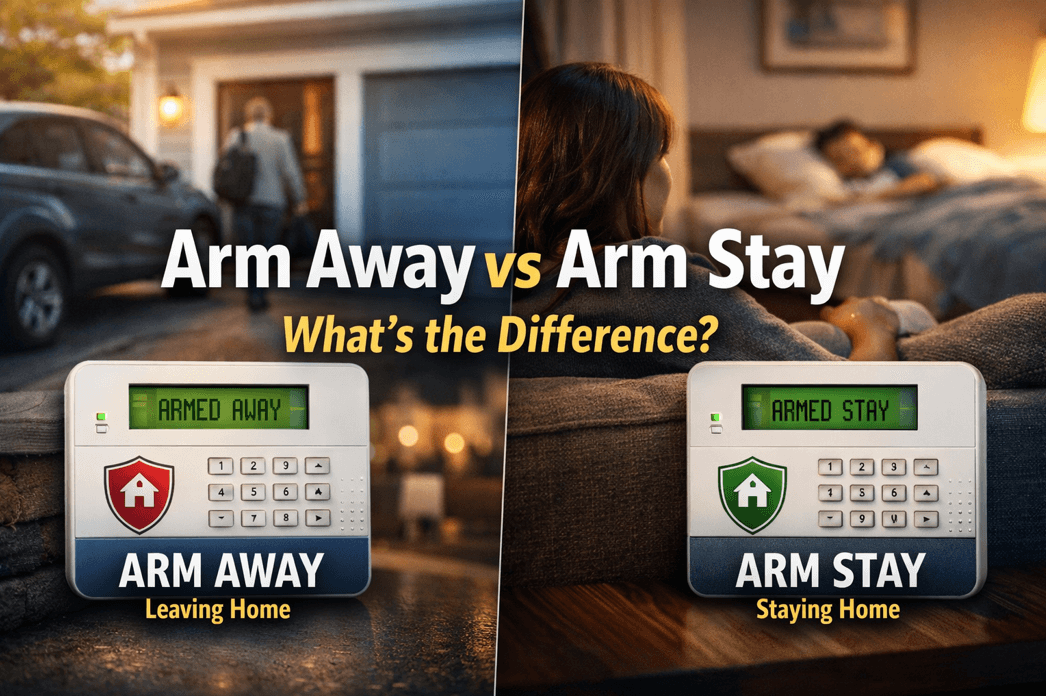
As a general rule, security professionals recommend Arm Away when the home will be empty and Arm Stay when someone remains inside. In this guide, we’ll break down arm away vs arm stay in simple terms, explain how each mode typically works, and help you choose the right setting for daytime, nighttime, family routines, pets, and everyday home security.
What Does Arm Away Mean?
Arm Away is the setting you use when everyone is leaving the house.
When your system is set to Arm Away, it typically activates:
- Perimeter sensors, such as door and window contacts
- Interior motion detectors
- Other devices included in your security setup, depending on system programming
The purpose of Arm Away is to fully secure the property when no one is inside. Because the home is expected to be empty, motion detectors are turned on to detect movement if someone enters unlawfully.
Use Arm Away When:
- You leave for work
- You go on vacation
- You leave the house to run errands
- The entire household is away
What Does Arm Stay Mean?
Arm Stay is the setting you use when someone is still inside the house.
When your system is set to Arm Stay, it usually activates:
- Perimeter sensors, such as doors and windows
- Selected protection zones around the home
In most systems, interior motion detectors are bypassed or turned off during Arm Stay. This allows you to move around inside the home without triggering the alarm, while still keeping the outer perimeter protected.
Use Arm Stay When:
- You are home for the evening
- Your family is asleep upstairs
- You want overnight protection
- Someone is staying inside while others are out
Arm Away vs Arm Stay: The Main Difference
The main difference between arm away vs arm stay is simple:
- Arm Away protects the home when no one is inside
- Arm Stay protects the home when people are inside
- The biggest functional difference is usually the motion detectors.
In most systems:
Arm Away = doors, windows, and interior motion sensors are active
Arm Stay = doors and windows are active, but interior motion sensors are not
This is what allows you to stay inside comfortably while still keeping your home secured.
Arm Away vs Arm Stay: Which One Is Better?
Neither setting is “better” in every situation. The right choice depends on whether the home is occupied.
Choose Arm Away if:
- Everyone is leaving
- You want full protection, including motion detection
- The house will be empty for a period of time
Choose Arm Stay if:
- You are home but want security protection
- You are sleeping and want perimeter protection overnight
- You want to avoid setting off interior motion detectors while moving around indoors
In other words, the better option in the arm away vs arm stay comparison is the one that matches what is happening in your home at that moment.
Why Arm Stay Is Important at Night
Many homeowners make the mistake of only using their alarm system when they leave the house. But one of the smartest ways to use a security system is to arm it in Stay mode at night.
When you choose Arm Stay before bed, your system can help protect:
- Exterior doors
- Ground-floor windows
- Entry points around the home
At the same time, you can still get up during the night without triggering interior motion sensors.
For many families, this is one of the most practical and valuable uses of a home alarm system.
Common Mistakes People Make With Arm Away and Arm Stay
Understanding arm away vs arm stay also means knowing what not to do. Here are some common mistakes:
Using Arm Away While Someone Is Still Inside
If interior motion detectors are active and someone walks through the house, the alarm may trigger.
Forgetting to Arm the System at Night
Many break-ins happen through doors or windows. If the system is not armed in Stay mode, that layer of protection may be missing.
Assuming Every System Works Exactly the Same
While most alarm systems follow the same basic logic, programming can vary by brand and installer. Some systems have additional settings like Night mode, instant arming, or custom sensor bypasses.
Not Knowing Which Sensors Are Active
It’s important to understand exactly what your system does in each mode. If you are unsure, check your keypad, mobile app, or ask your alarm provider to walk you through it.
Does Arm Stay Turn Off Motion Sensors?
In most professionally installed alarm systems, yes—Arm Stay usually bypasses interior motion detectors.
That said, not all systems are programmed exactly alike. Some homes may have:
- Specific motion detectors left active
- Separate zones customized for certain areas
- Additional settings for garages, basements, or detached buildings
If you are comparing arm away vs arm stay on your own system, it is always a good idea to verify how your installer configured each mode.
Does Arm Away Activate Every Sensor?
Arm Away generally activates the full security setup, including perimeter protection and interior devices like motion detectors. However, the exact behavior depends on your system design.
For example, some homes may also include:
- Glass break detectors
- Smoke or heat detectors
- Flood sensors
- Carbon monoxide detectors
- Smart home integrations
- Life-safety devices like fire and carbon monoxide detection are often active all the time, regardless of whether the system is set to Arm Away or Arm Stay.
Arm Away vs Arm Stay for Families, Pets, and Daily Life
Your daily routine matters when deciding between these two modes.
If You Have Pets
Some motion detectors are pet-friendly, but not all are. If your pet moves through a protected area while the system is in Arm Away mode, it could potentially cause issues unless the detector is designed and installed correctly.
If Someone Is Working From Home
Arm Stay is often the better choice if one person remains in the home while others leave.
If Kids Are Sleeping Upstairs
Arm Stay is ideal overnight because it helps secure doors and windows while allowing movement inside the house if needed.
How to Choose the Right Setting Every Time
A simple rule can make this easy:
Leaving the house? Use Arm Away.
Staying in the house? Use Arm Stay.
That’s the easiest way to remember the difference in the arm away vs arm stay decision.
You can also build this into your routine:
- Arm Away when the last person leaves
- Arm Stay before bed each night
- Review your app or keypad to confirm the correct mode is active
FAQ: Arm Away vs Arm Stay
What is the difference between Arm Away and Arm Stay?
Arm Away is used when no one is home and usually activates both perimeter and interior motion sensors. Arm Stay is used when someone is home and usually keeps perimeter sensors active while bypassing interior motion detectors.
Should I use Arm Stay at night?
Yes, Arm Stay is commonly the best setting for nighttime because it protects doors and windows while allowing people to move inside the home without triggering interior motion sensors.
Will Arm Away set off the alarm if I am inside?
It can. In many systems, Arm Away activates interior motion detectors, so moving around inside may trigger the alarm.
Does Arm Stay still protect doors and windows?
Yes. In most systems, Arm Stay keeps perimeter protection active, including door and window sensors.
Which is better: Arm Away or Arm Stay?
Neither is universally better. Arm Away is best when the home is empty. Arm Stay is best when people are inside.
Final Thoughts on Arm Away vs Arm Stay
When it comes to arm away vs arm stay, the difference is all about whether the home is occupied.
Use Arm Away when everyone leaves and you want full protection, including motion detection. Use Arm Stay when people are still inside and you want perimeter protection without triggering interior sensors.
Knowing how to use these settings correctly helps you get more value from your security system, improve your day-to-day safety, and reduce the chance of false alarms.
If you are unsure how your current alarm system is programmed, it’s worth reviewing the setup with your security provider so you can use every feature with confidence.
With questions please feel free to contact our Alarm New England security experts using the button below!