Components of an Access Control System

Keeping track of your employee turnover, stored inventory, employee information, and valuables in display cases can be tricky.

Each business owner has unique security needs that can easily be met by an access control system. But what exactly are the components of an access control system? In this overview, we will discuss this question in more detail.

Access Control System Hardware

Here is a brief guide to various access control system parts.

Key cards and fobs

One of the things that buildings have to replace quite often is keys. However, when you have an access control system in place, key cards or access cards take the place of keys. Key cards will not only save you money on key replacement costs but are also easier to store.

Key cards allow you to access your building or certain rooms in a building by simply scanning or swiping them through a reader. Because each card is uniquely encoded, you can determine what door it can access. Essentially, this means that some areas of your building can remain inaccessible if need be.

Key cards are normally no larger than a normal bank card, which means they can easily fit inside a wallet. You can disable a key card at any time. In other words, if you lost your card or it got stolen, you won’t need to worry about any unwelcome visitors being able to access your facility.

You can also get fobs or key cards that grant access based on proximity. These work using radio-frequency identification (RFID), and you simply need to hold up the card or fob to the reader to gain entry.

Key card readers

One of the most important parts of a door access control system is the card reader. This electronic device scans the entry cards to grant your access to a building or room. While there are several types of card readers, they are all programmed to read the unique code of an entry card.

Decide which type of card reader will work best for your business before investing in an access control system. Card readers normally attach to the door itself or can be mounted to the wall next to the door they control.

The more restricted areas you have, the more card readers you will need. The great thing about them is that you don’t have to enter a password to enter. You can simply swipe, scan, or insert your key card to enter the room.

Keypads

If you prefer to not use entry cards to gain access to a building or restricted area, then keypads may be the perfect solution for you.

With a keypad, you don’t have to keep tabs on any access control parts. Instead of scanning an entry card, you can enter a passcode on a numeric keypad to enter a building or room.

However, it doesn’t have to be an either-or situation. You can use both card readers and keypads in your access control system.

Keypads act as an extra layer of security. You can use both a card reader and a keypad at the same door if need be.

Biometric readers

Keyless access systems

If you don’t want to carry around a key card or remember a pin code, then you could opt for a keyless system or smart lock. This can function using your smartphone. The reader uses Bluetooth to communicate with your phone and grant access via an app.

Keyless systems are convenient and secure as you need to have the right credentials on your phone in order to gain access.

Locking components

Every door needs a lock. With access control systems, this lock is electronic so that it functions alongside the card reader or keypad to lock or unlock the doors when access is granted to a building or a room.

There is more than one type of electronic hardware available, such as electromagnetic locks or electric strikes. The electric lock hardware you install will be dependent on the type of door.

Electric lock hardware allows you to freely exit the building whenever you need to. This means that in case of an emergency, you can unlock all doors instantaneously, ensuring that everyone will be able to get to safety and not be hindered by your access control system hardware.

Field control panels

Field control panels are the parts of door access control systems that help connect all elements together via a control panel. These panels are responsible for processing and relaying access control activity throughout the entire building to the access control software.

If you have a relatively large building with lots of access control activity, then you will need more panels. If you have a smaller location, then you may need to install only a couple of panels.

These panels are typically installed via electrical, communication, or telephone closets.

Alarms

To ensure the safety of staff or customers, access control systems often connect to fire or intrusion alarms. This helps your entire business security system to work in unison should an emergency occur.

If a fire breaks out or an unauthorized person attempts to access doors that are controlled by electric lock hardware, your access control system can sound an alarm.

Installing an Access Control System in Your Building

Key Fob & Key Card Access Systems

While advancing technology has led to many incredible security improvements in recent years, key fob systems are by far one of the easiest and simplest innovations yet. A key fob entry system combines physical hardware and sophisticated software into a convenient modern package.

Key fob systems are easy enough for everyone to use. In fact, if you have visited a hotel within the last few years, you have likely used this tech yourself to access your room. In addition to the aesthetic perks, key card security systems keep unwanted intruders out while also assisting visitors in real time.

When you need to protect your home or business, contact Alarm New England for a free quote. Discover how we can set up a customized, secure key fob system to suit your needs.

How Do Key Fob Entry Systems Work?

Key fob door entry systems may look different from model to model, but most operate under the same basic principles. The process for using these systems generally includes the same steps:

  • Your security card and key fob use electromagnetic or radio wave technology to emit certain wireless signals. You can customize these signals with unique credentials for every user who needs access.
  • The access reader system is installed at key entryways, normally right by the door for easy access.
  • Anyone wishing to enter the restricted area must first present their credentials. Some key cards only need to be in proximity to the access reader, while others require swiping through a card reader.
  • The reader communicates with the card and key fob via wireless signals to verify the credentials. The verification process will vary based on the model of the key card access system.
  • If the system recognizes and approves the credentials, the access reader unlocks the door and allows entry.

The process is simple, efficient, and quick. There’s no need to worry about making multiple copies of metal keys, manually paging in visitors, or constantly changing passwords. Instead, users can swipe their cards, scan their credentials, and get on with their work.

Types of Key Fobs and Key Card Access Systems

While all card and key fob systems use similar technology, many types of key access systems are on the market. The best one for you will depend on your security needs and personal preference.

Electromagnetic key cards

Electromagnetic key cards (like Wiegand and swipe key cards) require physical interaction with the reader to work.

Wiegand key cards

Wiegand key cards are one of the oldest versions of electronic key cards on the market today. In these systems, magnetic polarization and specially-made wires transmit data. This data can be almost anything (such as credit card information or medical data) and provides the basis for much of today’s access control tech.

The user usually swipes their Wiegand card through the reader, where the magnetic field in the reader interacts with the wires in the card. These wires will react, and when the wires change in certain ways, the reader translates these signals as the owner’s credentials.

Swipe key cards

Like their Wiegand counterparts, swipe key cards have a magnetized strip coded with a unique pattern. Users swipe these cards (like a credit card) for access. The readers automatically detect predetermined patterns as authorized credentials.

Unlike Wiegand cards, system administrators can wipe and recode swipe cards to program different credentials or rewrite them to work with a separate lock.

Radio frequency cards

Another class of key card access systems uses radio frequency technology to assign credentials.

RFID key cards

Radio-frequency identification (RFID) key fobs and cards emit radio waves to communicate their credentials. The card readers send signals via excite fields. When the corresponding RFID cards are in range of these fields, they relay a signal back to the reader to open the door.

Proximity key cards

Proximity cards work similarly, except their radio frequencies are different from the RFID cards. Users also need to be close to the card reader for the signals to connect.

Passive readers use radio frequencies and require cards to be held closer to the reader to work. “Active readers, on the other hand, generally have their own power source (such as a lithium battery) and work at longer distances.

At Alarm New England, we have experience designing, customizing, and installing both electromagnetic and radio frequency key fob systems. In your consultation, we will discuss your needs to create a key card system suited to your building.

Benefits of Commercial Key Fob Door Entry Systems

Due to their compact size and their prevalence on the market, many companies use these key card systems for business operations that require automated and restricted access. Rather than using biometrics or cumbersome passwords, key fob systems let business owners implement intelligent security measures that still have the same ease as a regular lock and key.

Key fob door entry systems offer many other convenience and security benefits.

Simplified access control

Business owners can quickly and easily add or remove access for individuals from a single dashboard. This makes it easy to:

  • Upgrade a user to access more restricted areas
  • Quickly onboard a new hire
  • Allow temporary access
  • Activate new cards in bulk
  • Program cards to deactivate automatically after a certain date

Automate access rules and schedules

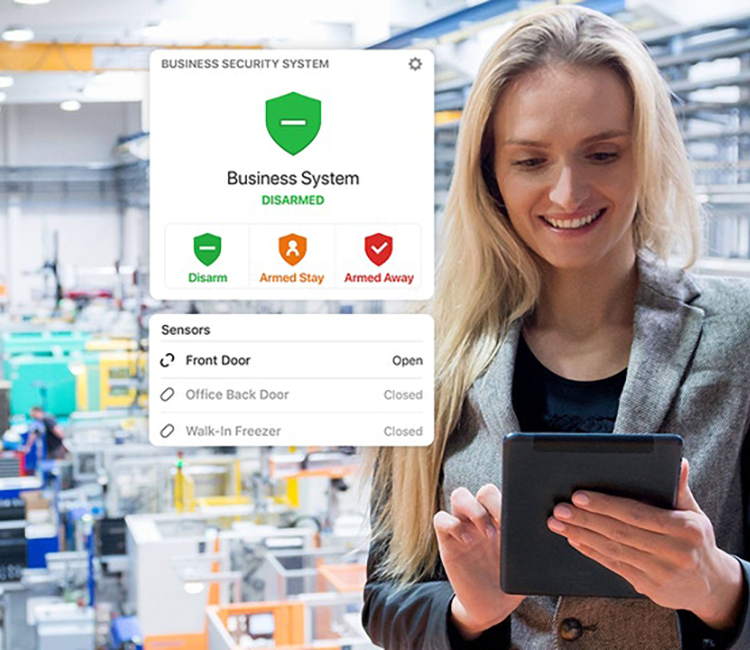
Key access systems combine the functionality of the physical card with the convenience of an automated system. In addition to unlocking automated doors, users can program their security system to arm and disarm in response to designated employee badges.

Your first employee can disarm the system easily when they first come in for the day, and with a simple double tap of their card, they can arm the system again on their way out of the door.

Intuitive for employees or tenants

Key card systems are easy to use. They completely avoid some of the difficulties of other security measures. Tumbler locks and metal keys are bulky and difficult to operate in poor weather, but tapping your fob against an electronic reader is simple and fast.

As electronic security measures grow more and more popular, having a key card that fits in the credit card slot of your wallet makes life easier for everyone. Most people already know how to use a key card from their own travels, and if they do not, teaching them the process is quick and easy.

Easy administration

Commercial key fob door entry systems help business owners automate their security measures while still giving them the option to track their progress. This trackability is crucial to ensuring your security measures are working as designed.

If breaches ever happen, managers can quickly look up the data for specific readers and see where the disconnect occurred. They can monitor which doors opened, for how long, and who opened them.

If a user ever loses their key card, replacing it is quick and easy. The manager can deactivate their card immediately and reissue a new one with new credentials, which is much faster and cheaper than replacing the entire lock!

Key Card Access Systems for Small Business Security Needs

At Alarm New England, our experienced technicians design, install, and service key card fob systems for businesses of any size.

Key access security locks give small business owners better control over their assets. If you’re constantly on the go, this awareness lets you make informed business decisions anytime, anywhere.

Where can you use a key fob system?

These units are versatile at any scale, even with only a few access readers and a minimal portfolio of access cards. Some common scenarios include:

  • Many establishments install access readers outside of employee-only entrances, such as entryways for kitchens and staff-only break areas.
  • Businesses with large equipment storage areas (especially those with high-value assets, like computers or construction equipment) install access systems to prevent theft or misuse by employees.
  • Private communal living areas, such as college dorms or apartments, employ key card access systems to ensure the safety of their residents.
  • Companies with physical file storage, such as small medical clinics or real estate offices, need to ensure that only trained employees have access to these documents.

What can fob key card access systems do for you?

Key fob systems let any business control who has access to their space, staff, and information. Using time-tested electromagnetic technology, these access systems have exponentially improved in recent years, offering users a more streamlined and customizable experience.

These systems are perfect for users who still prefer a physical component to their security measures. Key cards are easily programmed, easy to use, and just as easily replaced if the original card ever gets lost or stolen. This convenience helps lower your operational costs, all without sacrificing your physical security and peace of mind.

If your business could use an efficient and effective key card security system, consider what key fob access control systems could do to keep you safe and productive.

Call Alarm New England at 857-445-4010 to discuss your security and alarm needs and discover what our family-owned, locally operated alarm company can do for you.


Ultimate Guide To Adding Cameras To Your Smart System

If you have an alarm system, chances are you have thought about adding cameras. Why not? Cameras have a wide range of uses and can be an additional layer of security.

While the installation of cameras may be relatively simple, having them stay online 24/7 and not drop off can be a real challenge.

Garage Outdoor Cam Powered by ADC

If you’re interested in knowing more about the network and internet requirements for WiFi based cameras, keep reading.

Option 1: Cameras Over Wi-Fi Home Network

Commonly the most cost-effective way to add cameras to your system is to simply draw power through an outlet and connect the cameras via your home WiFi network. With this option there is no need for pulling any cable or wire. Just the power source will be hard-wired.

A general rule of thumb we tell our clients is that for every camera you have on the system, you want 2MP of upload speed. So, if you were looking for 4 cameras indoor/outdoor, you will need a minimum of 8MP upload speed from your internet provider (Xfinity, Verizon, Spectrum) on a dedicated network for the best experience.

You may be told from your internet provider the “maximum” speed that your plan includes; however, you still need to run an internet speed test.

We recommend using https://www.speedtest.net/

  1. Press Go in the middle of the screen
  2. The first number given to you is the DOWNLOAD speed
  3. The second number given to you is the UPLOAD speed *this is the one you need to note*
  4. Write down the upload speed number and give to your Alarm New England sales representative

Considering and answering these questions will help you determine your security needs and in turn, where to place them for maximum efficiency.

Option 2: Hardwiring CAT5/CAT6 Cable

For clients wishing to have the most reliable connection for their cameras or to have a more advanced solution (24/7 constant recording), we offer the option to hardwire the Alarm.com power AND internet source. Wired cameras typically have fewer issues with dropped signals or recording issues due to a weak internet connection.

So what does it mean to run CAT5/CAT6 Cable? In order to establish a direct connection between the internet and your cameras, we would require cabling run from the network room to each individual camera’s location.

You may be asking, but why doesn’t everyone choose this option?

Your Camera Options:

Now that we have covered a couple different ways to test and set-up your security cameras, let’s cover types of cameras.

Indoor Fixed w/IR (ADC-V522IR)

ADC indoor

Often used to check up on pets and activity within the home or business, the Alarm.com Indoor camera supports 1080p HD video, infrared night vision and secure cloud recording.

With its compact design and flexible mounting options, the ADC-V522IR is easy to install, and is the lowest-cost option within our camera portfolio.

Features

  • HD 1080p video
  • IR night vision
  • Wide dynamic range (WDR)
  • Two-Way Audio (limited)

1080p Indoor Wi-Fi Camera (ADC-V523)

ADC Indoor Camera with Built in Analytics

Powerful Video Analytics from Alarm.com and direct ethernet connection differentiate ADC’s second generation of indoor camera. Internal testing has proven this generation of camera from Alarm.com to be slightly sharper for both resolution and overall connectivity.

Features

  • 117° field of view
  • High Dynamic Range (HDR)
  • Two-Way Audio
  • Ethernet Connection or Wi-Fi (2.4 GHz or 5 GHz)

1080p Outdoor Wi-Fi Camera (ADC-V723)

ADC Wi-FI Outdoor Camera

With a wide field of view, night vision, and High Dynamic Range (HDR), the ADC-V723 lets you see what’s important – no matter the time of day or lighting conditions.

Features

  • 117° field of view
  • High Dynamic Range (HDR)
  • Wi-Fi (2.4 or 5 GHz)
  • Waterproof & Dust-tight

Requirements:
Power 12 V – 1 A DC power adapter (included)
Network Wi-Fi (2.4 or 5 GHz) connection to broadband Internet

Alarm.com 180° HD Camera ADC-V622

ADC Wellness Camera

The Alarm.com Wellness Camera is a wide-angle camera, designed for keeping an eye on family or pets within the home. Covering a full 180° view, this indoor camera is best to cover larger rooms or areas of space. Improved audio connection and zoom capabilities differentiate this camera from Alarm.com’s first gen indoor camera.

Features

  • Audio
  • Power over Ethernet
  • IR night vision
  • 180° FOV
  • Digital pan/tilt/zoom
  • Tap to call out
  • Bluetooth music streaming

Alarm.com Video Doorbell (ADC-VDB770)

Alarm.com Gen 2 Doorbell Camera

The second generation video doorbell camera from Alarm.com has an expansive 150° vertical Field of View, two-way audio and full portrait viewing in the app make it easier than ever to see a speak with visitors. Built-in analytics from Alarm.com result in the most advanced doorbell camera on the market to date.

Features

  • Expansive FOV (150° V, 115° H)
  • Full HD (1440 x 1920) video resolution
  • High dynamic range (HDR)
  • IR night vision
  • Video Analytics for faster, more relevant alerts
  • Live video and saved clip viewing
  • Two-Way Audio through the mobile app
  • Battery heater for low-temperature operation
  • 2×2 antenna for improved Wi-Fi range
  • Compatible with mechanical and digital chimes

Stream Video Recorder (ADC-SVR122)

ADC CSVR

Created specifically to work with the Alarm.com video cameras, the Alarm.com Stream Video Recorder provides 24×7 professional local video storage solution. With the Stream Video Recorder, you can connect up to eight Alarm.com video cameras for continuous recording.

Specifications:
Storage 500GB, 1TB, or 2TB of storage
Transcoded playback MPEG4 H.264
Speed control 1x, 4x, 8x, 16x

Indoor/Outdoor Mini Bullet (ADC-VC725)

ADC%20Bullet%20Camera-jpeg.jpeg

The ADC-VC725 from Alarm.com is a high-performance mini bullet camera optimized for indoor and outdoor video monitoring. The camera features a dust-resistant exterior casing with an IP66 rating and Power over Ethernet (PoE) capabilities. Often used in small business settings, the bullet indoor/outdoor camera from Alarm.com is an affordable alternative to complex DVR or NVR business solutions.

Features:

  • Power over Ethernet
  • IR night vision
  • HD video
  • IP66-rated waterproof & dust tight
    • This allows the camera to be mounted outdoors

Next Steps!

Still have questions about your network bandwidth and adding cameras? Simply, call 800-322-3500 ext #2 for sales or email “sales@alarmnewengland.com”.

If you’re interested in a new security system, visit our site to learn about us and how we can help.

Buyer’s Guide to Security Camera Systems

Security camera systems are a powerful tool for protecting your home or business.

And with the technological advances that have been made in image quality, size, and wireless capabilities, it’s important that you understand all of the options available to you.

Certain cameras are better suited to some situations, so choosing the right surveillance camera for the job can save you a lot of time, frustration, and money.

Benefits of Security Cameras

Security cameras are far more powerful tools than we often think. The point is not necessarily just to deter crime, although that’s a major part of it. Here’s a number of different ways security cameras can help you:

  • Provide a strong visual deterrent
  • Identify passing vehicles and their plate numbers
  • Survey the area when you’re not around
  • Detect fires
  • Detect intrusion (line crossing)
  • Detect suspicious traffic (e.g. someone scoping out the house)
  • Object removal detection (know when someone removes things from your backyard or shed)
  • Send a notification when someone is at the edge of your home’s perimeter
  • Confirm whether contractors arrived and left when they said they did to ensure they bill the correct amount

There are 4 different types of security cameras:

  1. Fixed indoor cameras
  2. Dome cameras
  3. PTZ cameras
  4. Bullet cameras

Fixed indoor cameras are stationary cameras that come in a variety of different styles. They are popular due to their affordability and ease of use.

honey well wic security camera systemHoneywell WIC1 Indoor Camera

Dome cameras are those dark, bulb-shaped devices you’ve probably noticed in the ceiling of a department store, a bank, or a government office. They’re designed to be tamper-proof.

dome camera axis surveillance camera systemAxis Communications M3025-VE 2MP Outdoor Dome Camera

PTZ cameras (pan-tilt-zoom cameras) allow you to pan side-to-side, tilt up and down, and zoom remotely. If you’ve got a wide viewing angle to cover, one PTZ camera can get a fuller picture compared to most others.

dahua ptz security camera for business and home security Dahua 2MP 30X Zoom Megapixel 1080P HD Oudoor IP PTZ Network Security Surveillance CCTV Camera

Bullet cameras are fixed cameras that can be used indoors or outdoors. This is probably the most traditional design that we associate with security cameras. They’re a little bit larger than the other options, but these are most commonly found in security camera system kits.

amcrest 1080p hd security camera for outdoor security1080p Bullet Outdoor Security Camera

We can break down all of these camera types into two categories: wireless and wired.

Both have their pros and cons:

Wireless cameras have become popular in the past decade as data transfer rates over WiFi increased, and wireless connections became more reliable. These are often used for general surveillance, baby monitors, and nanny cams.

There are also two different types of wireless cameras: traditional wireless cameras and wire-free wireless cameras.

Traditional Wireless vs Wire-free Wireless Cameras

Traditional Wi-Fi cameras, also known as IP cameras, have power cords that have to be plugged into the wall in order to power the camera. This is true for both indoor and outdoor wireless cameras.

While relatively easy to install for indoor use because of access to power outlets, it can become a bit more complicated when these cameras are placed outside.

Depending on your home’s design wiring, installation of these cameras may require some finesse to minimize exposed wires.

Wire-free cameras are battery-powered and, because they use Wi-Fi, have no external wiring.

Some wire-free cameras are also weather-resistant so they can be placed outside. Some wire-free cameras — like the Arlo — require a base station that must be plugged into your router. So, even though the cameras themselves are wireless, the system is not completely wireless.

When it comes to wired cameras, you also have two different types of cameras as well. You have analog cameras and you have POE cameras (power over ethernet).

Before going into the differences between these cameras, it’s important to understand the difference between a DVR and an NVR.

DVRs vs NVRs

A DVR (digital video recorder), is a device that you connect to analog cameras so you can view, manage, and record the footage that they capture.

lorex 8 channel security dvr for a comprehensive security camera system8 Channel Security DVR

An NVR (network video recorder) works with POE cameras and IP cameras, acting just like a DVR but with a few additional features.

One distinguishing factor is that some of them have POE ports in them, so you can plug the cameras directly into the NVR, record your videos, and manage your cameras.

dahua nvr network video recording for security camera systemDahua NVR608 128 Channel Super 4K Network Video Recorder

You can also connect IP cameras that you have on your network to the NVR. Even though they’re not directly connected to the Wi-Fi, it can still manage them. Another thing to keep in mind is that NVR supports higher camera resolutions than DVRs because ethernet cables can handle a lot more bandwidth.

Analog vs POE cameras

Analog security cameras use technology called BNC. BNC is an older video cable technology that used to be the standard for surveillance and video equipment.

bnc cable for security cameras

If you have newer analog cameras, you can use BNC to support HD (720p) resolutions. If you buy analog cameras, you’ll have to get a DVR to connect your system, view your videos, and manage your cameras.

Although the price might be lower, analog will require you to snake wiring all throughout your house. Cables included in analog camera kits usually consist of a BNC connector on both ends and a power cord that power your camera.

The other type of wired camera is the POE camera.

POE cameras use a single ethernet cable for power and video, so it’s easier to set up compared to analog systems.

Keep in mind in order to use a POE camera, you have to have a network switch that supports POE. Most network switches don’t normally support POE, so you might have to buy a new one specifically with that feature.

Instead of doing that, you may want to consider an NVR that has POE ports on it. This has the added benefit of helping you manage your network traffic by preventing you from clogging up your network with video data.

poe ip security camera

POE cameras provide the best image quality of all the cameras, because ethernet supports higher bandwidth than a wireless connection.

If you need a really high resolution camera that lets you zoom in to capture facial features or license plates from far away, POE cameras are the way to go.

Resolution

Video resolution is measured in pixels or TVL, which stands for television lines.

resolution map for security camera system planning

For comparison, if you see a resolution description of 1920 TVL, that’s approximately the same as 1080p resolution.

Another measurement of resolution that you’ll see is megapixels. So you’ll see cameras that are described as having 2, 3, or 4 megapixels. To clarify, 2.1 megapixels is roughly 1080p, and any camera that goes higher than 2.1 megapixels is likely to be a POE camera, since ethernet is best able to support that extra bandwidth.

Which Camera Type is the Best?

Now that you know the difference between all these cameras, let’s talk about the pros and cons of each.

Wi-Fi Cameras

Wi-Fi cameras, or traditional wireless cameras, are the most common consumer-grade cameras out there. They generally have better image quality than most wire-free cameras.

Honeywell indoor security camera as part of home securityHoneywell WIC2 Indoor Camera

There are a lot of different Wi-Fi or IP cameras on the market, It’s important to keep in mind that the difficulty of installation and setup can range from “easy” to “moderately difficult” depending on which one you get — especially if it will be placed outside.

As a side note, If you want to buy several wireless cameras, you need to be aware that too many cameras on the same network can bog down your Wi-Fi.

Ease of Setup/Installation: 5/5

User Experience: 4/5

Image quality: 4/5

Price: 4/5

Wire-Free Cameras

The simplest of all these options are wire-free cameras because they’re easy to install and set up. Cloud subscription fees to store the video are reasonably-priced and the apps to control them tend to be well-designed which makes for a great user experience.

reolink argus surveillance camera

The downside to wire-free cameras is that they are battery-operated. If placed in a high-traffic area with a lot of motion to trigger it, the battery can drain quickly and will need to be replaced fairly often. One customer told us he had to change the batteries in his wire-free camera every three days due to cars passing by his house!

Image quality isn’t as good as other options because the videos are highly compressed to conserve battery life and to make the file small enough to store in the cloud.

Ease of Setup/Installation: 5/5

User Experience: 4/5

Image quality: 3/5

Price: 4/5

Analog Security Cameras

Analog security cameras are the most affordable if you’re on a tight budget or if you want to create an entire camera system. While you will have to run cable to connect them throughout your house, they’re relatively easy to install.

lorex security camera

Configuring them, on the other hand, takes a bit more patience.

One thing to pay attention to when buying an analog camera is the resolution because many cameras in this category are not high-definition (HD). Some manufacturers make false claims about image quality in their marketing materials.

Since these tend to capture lower quality images and require a BNC connector to record to an external source some of these cameras are being phased out in favor of higher-resolution cameras and things like POE.

Ease of Setup/Installation: 4/5

User Experience: 3/5

Image quality: 3/5

Price: 5/5

POE Cameras

POE cameras offer great image quality and reliability. They can support high-resolution cameras and they only require a single cable for everything.

dcs-6212L dome camera security system

The downsides of POE cameras is that they are harder to install, and may require that you run ethernet cables throughout your house.

They’re also more expensive compared to analog cameras and some wireless cameras.

Ease of Setup/Installation: 3/5

User Experience: 4/5

Image quality: 5/5

Price: 3/5

The Benefits of Security Cameras

Security camera systems and video surveillance provide great benefits for homes and businesses. They help deter theft and crime, allow you to monitor activity, help reduce insurance costs, and create a safer home environment and workplace. By keeping a constant eye on your home or business, you can help secure and protect your family, employees and business.

Deter Theft & Crime

One of the biggest benefits of a security camera system is deterring crime and theft. People are less likely to commit a crime if they know they are being watched or monitored with camera surveillance. In addition to random theft, employees may steal from a business. Although many business owners don’t like to think that their employees would steal from them, it does happen. Having footage can help give you the proof you need to catch the thief, plus the evidence can be used in court if needed.

Monitor Activity

No one is capable of being everywhere at once, but a security camera system allows you to keep a constant eye on your home or business. They are beneficial for monitoring the day-to-day activities to protect you and your interests. This can be especially beneficial at home when you are away from home or for businesses when there are remote sites and when a manager isn’t present at all times.

For businesses security cameras can help boost efficiency and productivity as well as provide the evidence needed to resolve conflicts.

Help Reduce Insurance Costs

If someone claims they were injured on your property and you have no proof of whether the event happened or not, your insurance premiums will likely increase. Having evidence of incidents that occur is extremely beneficial, especially if someone is trying to scam you. In addition, many insurance providers offer discounted rates if you install surveillance cameras in/around your home or business.

Create a Safe Environment

By installing a security camera system you are creating a safer home environment and workplace. Your family and employees will feel safer, and you’re more likely to prevent break-ins and vandalism.

There are many benefits to installing security cameras in and around your home and business.

Conclusion

While indoor cameras are effective for monitoring activity around and inside your home — to check on a child, nanny, or pet — cameras do not sound an alarm like the other sensors.

Cameras excel at letting you check-in on your home, deter unwanted visitors, and collect potential evidence.

Combine your security camera with other security products to create multiple layers of security; not just from burglars, but also from other hazards like fire and carbon monoxide.

The good news is that you can integrate your security camera with your security system so that you can access and control everything from a single app.

Want to learn more about protecting your home?

If you’re curious which security camera system would be most beneficial for your home or business, give the experts at Alarm New England a call! We can find the right solution for your specific needs so that you’re able to create a safer environment.

What’s It Like Living On Cape Cod Year-Round?

Cape Cod is one of those fun-filled locations that most people only see while on vacation. The Cape’s beautiful beaches go hand in hand with its sunny weather, and if you like a little adventure, there are some great hiking and biking trails in the area.

The Cape has something for everyone: beaches, natural parks, five-star dining options, traditional Cape architecture, and more.

A common misconception people have is that Cape Cod is too expensive to move to. But living in the Cape can be affordable as long as you avoid prime areas—it’s a location that can cater to every lifestyle.

Alarm New England has operated an office out of Yarmouth for decades now, so we know the ins and outs of Cape Cod, how to protect Cape Cod homes, and what it’s like to live there for the long-haul.

FREE QUOTE: ALARM NEW ENGLAND – THE BEST CAPE COD HOME SECURITY COMPANY →

So whether you’re planning on becoming a Cape Cod resident or you’re just dreaming about moving there, here’s what living in Cape Cod is like.

A Brief History of Cape Cod

The Cape was originally home to the native Wampanoag people until the 17th century. In 1620, the Pilgrims landed in Cape Cod at Provincetown before settling a month later in Plymouth across the Cape Cod Bay.

map of cape cod

Twenty years later, European settlers came to Cape Cod and began to spread into the Cape. They learned from the Wampanoag people and adopted the native farming and fishing techniques. Settlers even built homes similar to those of the natives at first before building European-style homes.

Over the centuries, Cape Cod became more and more of a tourist destination. In the 19th century, people from Boston would travel to the Cape by boat or coach, and as technology improved, train travel connected the Cape to Boston and Providence, Rhode Island.

Three canal bridges were eventually built, making Cape Cod easy to access, and tourists have been venturing to the peninsula ever since.

Navigating Around Cape Cod

Cape Cod is a peninsula in Massachusetts that curves out into the Atlantic Ocean. While the Cape is separated from the rest of the state by a narrow body of water, this stretch of land is easily accessible from Boston and Providence thanks to canal bridges.

Cape Cod spans the whole of Barnstable County and has 15 towns. To make it easier to remember where everything is, Cape Cod is split into four different sections: Upper Cape, Mid-Cape, Outer Cape, and Lower Cape.

map of cape cod by town

Think of Cape Cod as an arm, with the Upper Cape as the shoulder and the Lower Cape as the elbow. This visual will help you place towns and locations as different points on the Cape Cod arm.

Getting around the Cape

Even if you think of Cape Cod as four sections of an arm, the roads of Cape Cod can take a little getting used to. The road system dates back to the 17th-century hunting trails used by the European settlers, so you may encounter routes that seem to meander in strange ways.

However, it doesn’t take long to get used to them, and many of the Cape’s roads will lead you past some beautiful sights.

cape cod regional transit authority routes and fares

If you don’t want to drive in Cape Cod, there are public transit options available. Sit back and relax on one of the Cape’s buses. Some buses can take you around the Cape, while other buses connect Cape Cod to Boston, Brockton, and Providence.

Taking a trip out of Cape Cod

If you live in Cape Cod, you’ve got plenty of options for day trips and vacations. The Cape is well-connected to Boston and Providence by road and by public transportation.

You can reach either city within one to two hours, provided that traffic is reasonable, so locals often go on day trips to go shopping or see sights and museums. In fact, the cities are so close that many people even commute to work in Boston or Providence from the Cape.

As for vacations out of Cape Cod, there are bus services to Provincetown and Hyannis airports, which take the stress out of getting to the airport.

photo of barnstable municipal airport

Moving to Cape Cod

Before you consider moving to Cape Cod, it’s worth learning a bit more about the area and what it’s like to live there. Here are some things to consider before moving to Cape Cod.

Choosing your neighborhood

People often think of Cape Cod as one place, but there are so many distinct towns and villages within the Cape. Each town has its own quirks and perks, and each area offers a different lifestyle.

So before moving to Cape Cod, look into the different areas and choose the neighborhood that suits you best.

Ask yourself these questions to help decide which neighborhood is right for you:

  • Do you want to be close to convenience stores and public facilities? Or would you rather be in a more rural location?
  • Do you want to live just a few steps from the beach in a premium location? Or would you rather be away from the hustle and bustle during tourist season?

Cost of living in Cape Cod

People move to Cape Cod for stunning sea views, spacious ranch-style homes, and beautiful landscapes. However, these homes come with a price tag to match.

While the peninsula’s prime locations are more expensive, they offer the best of Cape life. Some of the more expensive houses have private beach access, while others have access to swimming ponds.

cape cod style home with large front year

Keep in mind that when compared to other prime locations, such as a wealthy suburb of Boston or a downtown luxury brownstone, top spots in Cape Cod may not be that much more expensive.

And if you look for towns and locations that are off the beaten path, you’ll find Cape Cod homes that are more affordable for all types of lifestyles.

Home insurance is typically more expensive in Cape Cod because the area is more susceptible to hurricane damage, but the lower property taxes offset this to some degree. There’s also no sales tax on non-luxury food and clothing, so the cost of living tends to balance out compared to a city.

A big factor when considering a move to Cape Cod is the lack of jobs in the region. Most jobs are in the tourism industry—there isn’t really a Cape Cod business district. So if you’re hoping to find work when you relocate, you may have to commute a greater distance to the nearby cities of Boston or Providence.

Crime rate in Cape Cod

For the most part, cities and towns on the Cape are relatively low-density and crime rates among the permanent population are low. Thanks to increased police presence on the Cape in recent years, the number of violent crimes in the area are largely declining across the board.

However, Cape Cod attracts tens of thousands of tourists each year, which can inflate crime statistics. The town of Barnstable ranked 93rd in the Top 100 Most Dangerous U.S. Cities list for 2017, according to NeighborhoodScout. To get a more well-rounded understanding of the level of day-to-day crime on the Cape, it’s better to follow local print publications or news websites such as Cape Cod Today.

As many homes in Cape Cod are vacant outside of the summer months, installing a home security system is crucial to keeping these homes protected year-round from burglars and environmental hazards like fires and floods. Installing an alarm system for your vacation home in Cape Cod is highly recommended to avoid costly repairs or insurance premiums down the line.

Should you feel unsafe while living on the Cape, there are steps you can take to secure your home from burglars, including adding a home security system. Read our list of 30 home security tips to prevent home invasions to learn more

What are the safest towns in Cape Cod?

According to the FBI, the safest towns in the area are Sandwich, Brewster, Bourne, Harwich, and Mashpee.

1. Sandwich

Not only is Sandwich the safest town but also the oldest in Cape Cod being incorporated in 1639. The overall crime rate in this town is 1.11%.

  • Population: 20.6K residents
  • Crime Rate: 11.1 per 1,000 residents

2. Brewster

There is no shortage of inns and B&B’s in Brewster. Home of the Captain Freeman Inn and Crosby Mansion this town takes silver with a crime percentage of 1.34%.

  • Population: 9.8K residents
  • Crime Rate: 13.4 per 1,000 residents

3. Bourne

Bourne is located on the western end of Barnstable County and gets the bronze medal with a crime percentage of 1.88%.

  • Population: 19.8K residents
  • Crime Rate: 18.8 per 1,000 residents

4. Harwich

Harwich is most well known for its cranberry bogs and the annual Harwich Cranberry Festival. This town is fourth on our list with a crime percentage of 1.91%.

  • Population: 12.2K residents
  • Crime Rate: 19.1 per 1,000 residents

5. Mashpee

One of the most diverse towns on the Cape, Mashpee starts the list with a crime percentage of 1.99%.

  • Population: 14.1K residents
  • Crime Rate: 19.9 per 1,000 residents

Traditional Cape Cod architecture

If you’ve visited Cape Cod before, you no doubt remember the unique style of Cape Cod architecture. Homes in the peninsula are often reminiscent of traditional New England homes constructed around the early 20th century.

You can buy a house with a history in Cape Cod. Some homes in the area are up to 200 years old, and while they involve a little more maintenance and a few more inspections, they often have a lot of character.

Two main styles of homes you’ll find in Cape Cod are Cape cottages and Cape ranches. Cape cottages evolved from the simple cottages that the earliest settlers learned to build.

cape cod cottage in wooded area

Cape ranches, on the other hand, date back only to the 1960s. Cape ranches are single-story homes with lower-sloping roofs than Cape cottages. Cape ranches are usually more affordable, as they have less attic space. You’ll also find homes built in a Georgian or federal style around the Cape.

cape cod style ranch home and shed

Enjoying Life in the Cape

Living in Cape Cod is the perfect experience if you want to fill your free time with fun and adventure and escape the fast-paced and crowded city life. The peninsula offers plenty of activities and opportunities to keep local residents entertained and active year-round.

Outdoor adventures

Cape Cod has many beautiful and pristine landscapes, so it’s an ideal location if you like to explore off the beaten track.

The weather is relatively warm for much of the year—well, warm by New England standards. This means you can spend more days outdoors, taking in the scenery.

cape cod lighthouse

There are hikes to be taken, and bike trails to cycle. If you’re feeling adventurous, go for a swim. While Atlantic cod aren’t as plentiful as they used to be on Cape Cod, there is still a variety of fish to catch. Buy or rent fishing gear and enjoy a peaceful afternoon out on the water. Kayaking opportunities abound, and kayak rental companies are spread out all over the Cape.

Sailing and boat trips are also available around the Cape, and if you’re lucky, you might even spot the occasional whale.

boats on hyannis port marina

Hit the beach

Beach days are the perfect way to relax, soak up the sun, and enjoy the water. And in Cape Cod, every day can be a beach day. There are so many beaches in Cape Cod that no matter where you’re based, you’ll never be too far from a gorgeous stretch of sand with lapping waves.

provincetown marina in cape cod ma

Because the Cape is such a popular tourist destination, you’ll be able to find a variety of seaside activities, especially during peak season. So whether you’re hoping to relax or adventure by the sea, Cape Cod is the place for you.

Clubs and classes

With its rich history and the diversity of the nearby cities sparking creativity, Cape Cod is a culturally diverse area. There are choirs, art classes, art history classes, and library clubs where you can gather with other locals to socialize and show off your creativity.

If you’re not into the arts, there’s still plenty to do. Try an astronomical society, a hiking club, volunteer opportunities, and classes teaching all sorts of skills.

Cape Cod: The Perfect Place to Live

Living in Cape Cod is a dream that can be made a reality. The laid-back lifestyle, sweeping beaches, and lush landscapes make the Cape a paradise to live in.

Living in Cape Cod gives you the best of both worlds. During the colder months, you get the Cape’s beauty all to yourself.

two men fishing on a boat in cape cod with a lighthouse in the background

One of the most magical times in Cape Cod is in September. All of the tourists have gone back to work or school, and you can enjoy everything the Cape has to offer without the crowds. Residents take to the local restaurants, walk the now-quiet beaches, and remember why they chose to live in Cape Cod in the first place.

And, of course, during the summers, you get to soak up the sun and waves and enjoy the vacation-worthy vibe of the Cape.

X

GET FREE QUOTE

What are you protecting?*

Step 1 of 4

Is your property currently monitored?*

Step 2 of 4

What size is your property?

Step 3 of 4

Who is this personalized quote for?*

By clicking this button, you consent for Alarm New England to use automated technology to contact you at the number provided. This consent is not required to make a purchase from us.

Step 4 of 4