Home Automation Protocols Guide 2026

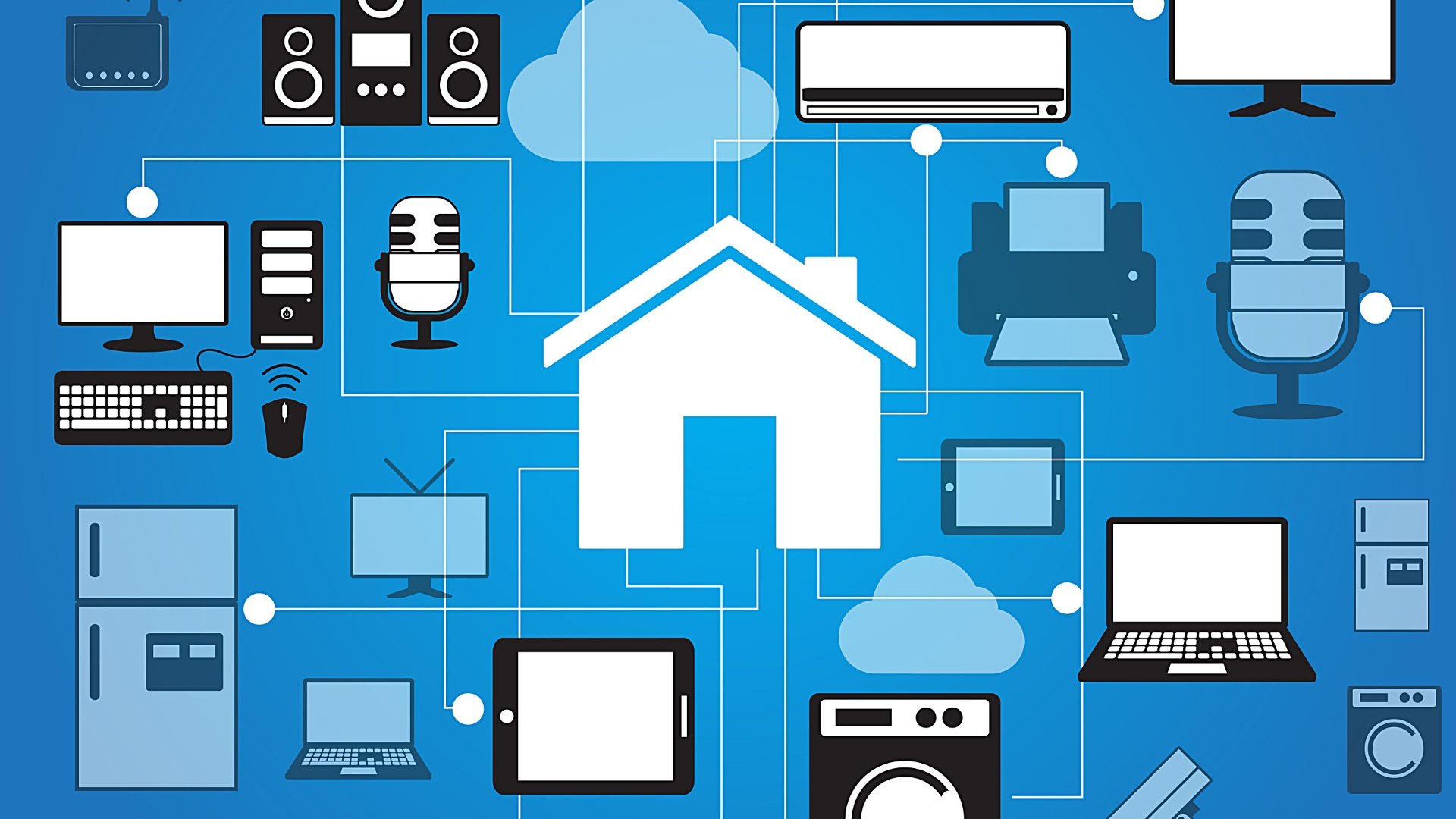
Home automation protocols are the language that smart home devices use to communicate with one another. Communication is vital for smart home automation, because if your devices can’t “talk” to each other using the same language, controlling each one becomes more of a chore.

Because of this, it is important to understand how it works before deciding which is best for you and your home.

With about ten different home automation standards on the market, it can be difficult to know which one is best for your home. There are two basic categories to work with: wired and wireless.

Common examples of wired protocols are X10 and UPB. These smart home protocols use your home’s existing wiring to communicate. Wired protocols are known for their reliability, but tend to be slower and more difficult to encrypt.

Wireless protocols, on the other hand, are typically faster and are compatible with a wider range of devices. These protocols — including Z-Wave and Zigbee — are able to connect and communication without relying on the use of power lines which makes them easier to ensure that they are secured. Many home security systems are compatible with Z-Wave, making it the ideal if you want full control of all of your devices on one app.

There are also a couple of hybrid protocols like Insteon and C-Bus that use a combination of both wired and wireless technology.

What should you look for when choosing a home automation protocol?

Compatibility: certain protocols restrict you to using devices that may not appeal to you, so choose one that is easy to use in conjunction with a broad range of other smart home products.

Easy to Upgrade: New home automation technology is introduced to the market constantly, having a system that is highly compatible with other products will ensure that you can add on more features and devices in the future.

Other considerations when choosing a smart home protocol include cost, power consumption, and bandwidth.

Popular Home Automation Protocols

Z-Wave

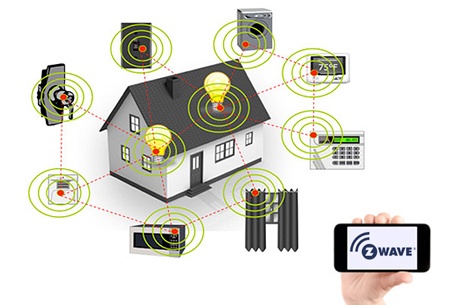
Z-wave is a popular wireless protocol that uses radio frequencies to to communicate with other devices. Developed in Denmark, Z-Wave has rapidly become one of the most popular protocols because it is supported by over 450 companies across the world.
z-wave

Features of Z-Wave

It’s fast. Z-wave runs on the 908.42MHz frequency. This is a much lower band than that used by most of your other household products (2.4GHz). Since Z-Wave devices don’t compete with other household products for bandwidth, there is a lower chance of interference, which improves efficiency and speed.

It’s easy to setup. Z-wave devices like the Yale smart lock are known for being simple to set up and fairly easy to use. Z-wave devices are controlled via a central hub that helps you manage your entire home network. Once the network is set up, you can easily add in smart home devices that can then be controlled by the Z-wave home protocol.

It’s compatible with a wide range of products. One of the best parts about choosing Z-wave automation is that any Z-wave device can communicate with another regardless of the brand, version or type.

Currently, there are more than 1,500 Z-wave compatible devices available throughout the world. With so many options, you have plenty of options to customize your home’s automation protocol.

It cuts down on energy usage. Additionally, Z-Wave devices tend to use less energy than some other protocols which means you can use more while keeping your energy bill low.

It’s future-proof. As home automation products continue to evolve over time, Z-wave will remain compatible with both old and new versions of products. This is ideal because it means that you can keep your same protocol even as technology advances.

ZigBee

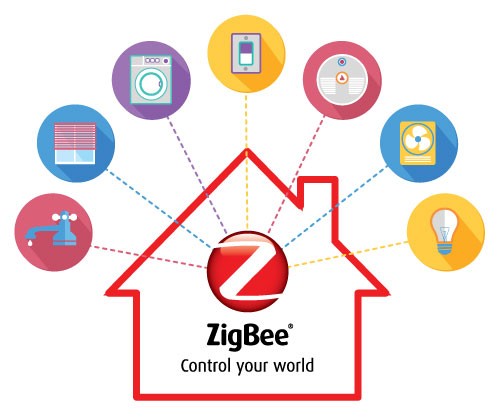
Zigbee and Z-wave are very similar protocols, although Zigbee is more common in Chinese-branded products. Originally developed for commercial use, today Zigbee is now used widely in both home and commercial automation protocols.
zigbee

Features of Zigbee

Fast communication. Similar to Z-wave, Zigbee uses radio frequency in order to communicate. Zigbee runs on the 802.15.14 radio standard. Using a mesh network, Zigbee can achieve fast communication and longer-range communication. A single hub powers multiple home automation devices.

Easy to create for. Zigbee is an easy protocol for developers to design new products that are compatible with it. Currently, there are over 1,200 products that are compatible with Zigbee. This is an open technology with new products being created all the time.

Low power consumption. One of the most powerful benefits of choosing Zigbee for your smart home automation is its super low power consumption. Zigbee is incredibly efficient, so you can actually operate a Zigbee device on the same set of batteries for years at a time.

Cut down on battery usage. Speaking of efficiency, Zigbee offers green power which eliminates the need to use batteries all together. This means you don’t have to worry about buying new batteries and that you can feel good about being environmentally friendly and efficient.

Improved security. Additionally, Zigbee is one of the most secure protocols available. It uses the same 128-bit bank-level encryption that most major financial systems utilize.

One issue Zigbee has faced in the past is having poor interoperability, meaning some Zigbee devices were unable to communicate with each other properly. However, newer versions of Zigbee have entered the market that aim to solve this issue and work well with other devices regardless of their brand.

Insteon

Insteon is unique in that it uses a mix of wired and wireless technology. It uses a patented dual-mesh network that utilizes both hardwired and wireless communication to help eliminate the weaknesses of both. There are multiple pathways for messages to travel.
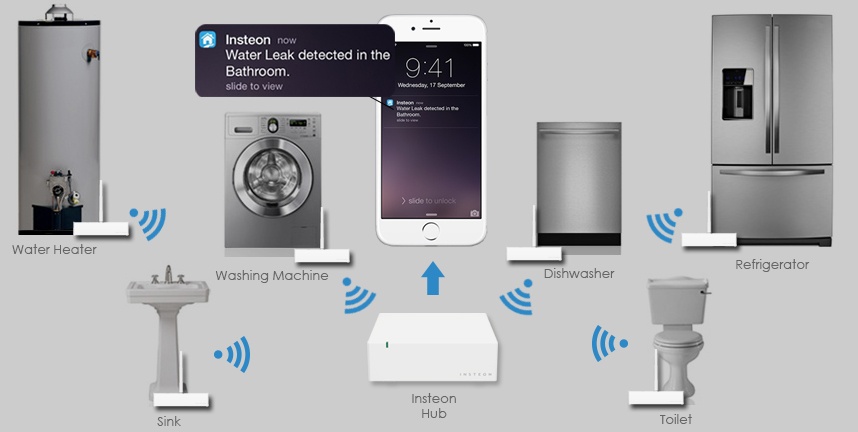
insteon

Features of Insteon

An Insteon hub will connect with all Insteon compatible devices. You then have control of your home via smartphone, tablet or computer. It is also X10 compatible which means that you can add wireless capability to an existing X10 network.

Extremely easy to use. One of the major benefits of choosing Insteon is its use of use. Regardless of high technically inclined you are, you will be able to get the Insteon home automation standard up and running with relative ease.

Simple setup: If you know how to operate a smart phone, you will be able to operate this system. Additionally, all Insteon compatible devices are automatically added to the network as soon as you power them on, making set up a breeze.

Limited product options. There are over 200 compatible devices to automate your home. Insteon makes all of the products that use their protocol, meaning it is less compatible with products made by other manufacturers.

Bluetooth

Bluetooth is a wireless smart home automation technology that uses radio waves to communicate. All Bluetooth devices contain a computer chip with Bluetooth software that allows it to simply connect with other devices.
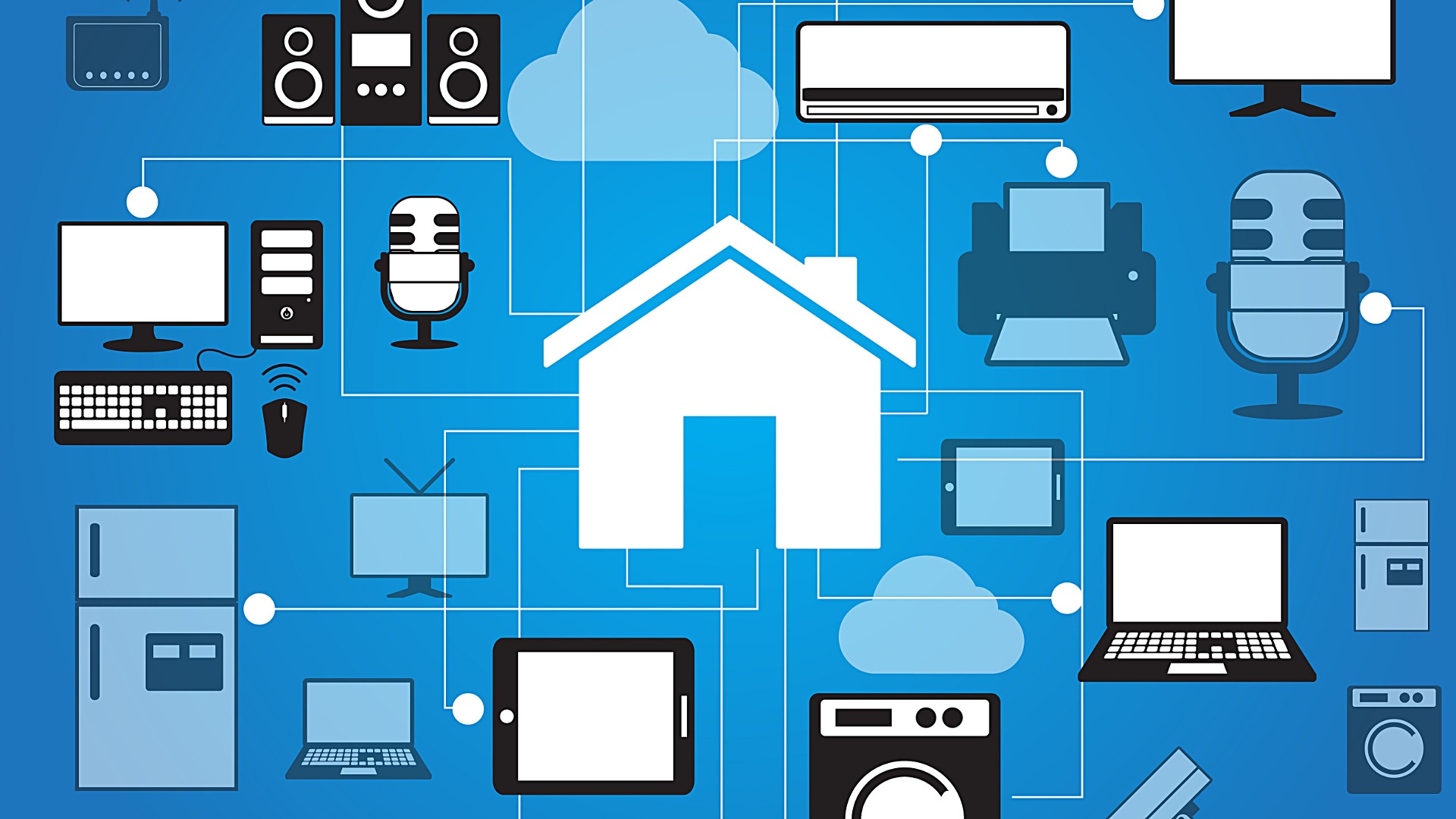
bluetooth

Features of Bluetooth

Bluetooth’s compatibility is excellent. You can connect any Bluetooth enable device to any other Bluetooth enabled device with ease.

You can noticeable energy savings. One of the biggest benefits to choosing Bluetooth for your home automation standard is that it uses significantly less energy than other alternatives. This is ideal for those who like to monitor their energy consumption and be environmentally friendly.

Limited range of communication. One downfall of this automation is that it tends to have a limited range, so your device may stop working if you move out of range. Fortunately, this might change as technology improvements are underway that will eventually allow Bluetooth to have a larger range that can better compete with ZigBee and Z-wave protocols.

UPB

UPB is short for universal powerline bus. This is a wired protocol that was created back in 1999 and remains one of the more technically advanced protocols.
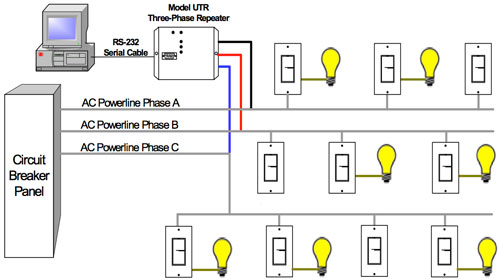
UPB

Features of UPB

UPB makes use of your home’s existing wiring to communicate between devices. This is not as user-friendly, but can provide more reliability if that’s a higher priority. As with Z-Wave and Zigbee, UPB-compatible devices are linked to one another using a central home controller. Each device needs to be manually set up to the network, making this a setup more time-consuming.

Reliable.Because it uses your home’s electric wires, it doesn’t run into as many interference and range issues that wireless protocols do. If you are somewhat tech-savvy and value reliability, UPB may be a great option for your smart home automation protocol.

Limited compatibility. Although UPB has been on the market for awhile now, it is not compatible with as many home automation products as some other choices. UPB is also known for being difficult to connect with wireless devices, limiting your ability to upgrade your smart home system with additional equipment down the line.

Conclusion

These are only some of the most popular protocols in use today; there are a number of smaller ones out there that were left out. If you are looking to install a home automation protocol in you home, we hope this information will provide a resource for you to get started.

With so many smart home protocol choices and options available to complement your smart home security system, you are sure to find one that suits your home’s specific needs.

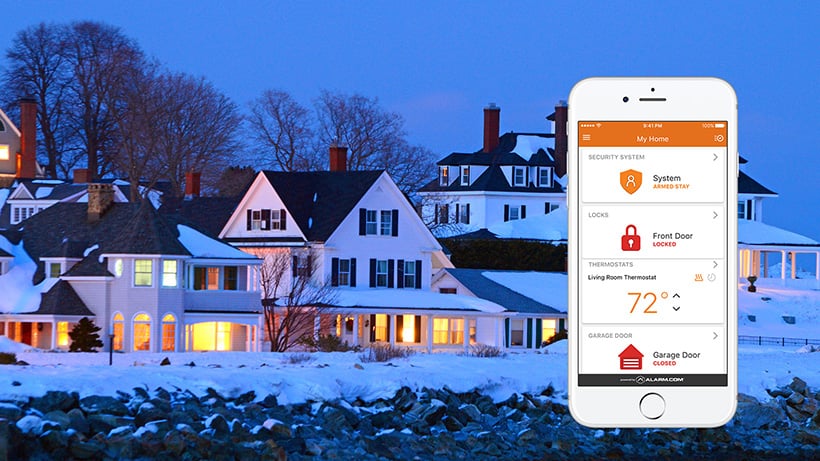
How Much Does a Home Security System Cost in 2026?

This post was last updated on 1/19/2026

There are many options when it comes to buying a home alarm system, including doorbell cameras, motion detectors, security cameras, and electronic locks. Regardless of variety, a home alarm system can be crucial in stopping a break-in, documenting important events and making homeowners and businesses always feel safe.

However, understanding everything about home alarm system cost, including labor, equipment, and system functionality can be difficult. Here’s how to help yourself out when it comes to alarm systems.

Local vs National

A local security comany, with over 47 years of experience, Alarm New England helps families and businesses feel safe and taken care of here in New England. With our extensive knowledge of security, we’re here to help you understand the cosst of home security and create the perfect alarm system for your home.

Smaller, local security companies specialize in home security in your community or town. Typically, local, privately-held security companies are known for better service and pricing. National companies may have better name recognition, but that doesn’t mean they are the best choice for you or your family. National security companies sometimes cannot work on brands of home security systems that you already have, while local home security companies can work with you to reuse any current home security system you are using.

Another benefit of using a local security company is that they are based near you. They can get to you quickly and usually have several home security technicians working in your area. National companies tend to have one technician for an entire region. Finally, most local alarm companies will work with you to create a customized system for your home. They are not just selling you cookie cutter packages. They want to custom design the best home security system for your home and family.

Know What You Need

When it comes to equipment, you should ask yourself what you’re wanting to protect and how much protection you want.  Selecting these items all contribute to your security system cost.

When it comes to equipment, you should ask yourself what you’re wanting to protect and how much protection you want. Do you want to make sure no one is lurking around outside? Do you want to see who’s at your front door at all times? Is controlling your system from your smartphone a must have? Selecting these items all contribute to your security system cost. There are various pieces of equipment that can come with a comprehensive alarm system such as:

  • Motion Detectors: There are multiple kinds, but all motion detectors are used to alert you when someone inside your home when they shouldn’t be. Motions can be extremely effective at covering a large space in place of window contacts. Higher quality motion detectors can usually understand the difference between a pet or a human; however, it’s important to read the product specifications to make sure you won’t be getting false alarms.
  • Video Doorbells: It can be scary to open the door when you don’t know who is on the other side. Video doorbells take that fear away by allowing one to see who’s on the other side of the door. Newer video doorbells may offer two-way talking so you can talk to who is at the door and they can answer you. In some cases video doorbells can trigger a doorbell when someone approaches and send alerts if children leave areas they aren’t supposed to. It can also protect packages that are dropped off at your door and a homeowner can see everything happening from your iphone app.
  • Electronic Locks: Electronic locks can be a great way to keep your home safe. Electronic locks come in many shapes and sizes and are better than regular deadbolt locks because they require special codes or biometrics to unlock them.
  • Security Cameras: It may be obvious, but security cameras have so many advantages. They deter criminals, allow you to have a constant eye on your property and save video that you can use if someone breaks in. There is a wide range of pricing, functionality, and overall quality for cameras. Wireless cameras can be cost effective but comes at the price of changing batteries every few weeks. In contrast, hard-wired traditional cameras can be expensive depending on the functionality. Often, the best cameras are exclusive to dealer channels without ever being on the market direct to consumers.
  • Smoke Detectors: Fires happen every day. The best way to keep your family and property safe is by having smoke detectors integrated with your alarm system. When smoke detectors are included with your security system, they are controlled by a keypad or control panel. If the system detects signs of fire it may alert you with a horn, siren or lights as well as notifying the alarm company which will react accordingly. The goal of smoke detectors are to ensure your safety by making sure everyone is aware of the threat, has time to evacuate and notify emergency personnel.
  • Door and Window Contacts: Door and window contacts are a two-piece system with one part sensor and the other part magnet. When a door or window is opened, if the alarm is on, and the sensor and magnet will separate, the sensor will get a signal to the alarm panel and an alarm – a chime or voice announcement will sound announcing the door has been opened.

It’s important to remember that burglars aren’t the only thing you need to protect your home from. Natural disasters and everyday events can wreak havoc on your life as well. Whether that be a fire, flooding or an earthquake, your alarm system can save you thousands of dollars if all the parts are working together.

  • Smart Thermostats: Families can easily turn their regular thermostats up and down all day long to make their home a comfortable temperature. Smart thermostats get rid of that hassle and handle your home temperature settings for you. Once you set temperatures for every time of the day you want, the smart thermostat takes it from there. Did we mention it could save you some money?
  • Flood Monitors: These monitors are usually offered as add-ons to most alarm systems. Flood monitors are used to detect leaks and water before a catastrophe happens. It could potentially save thousands of dollars because your home won’t get ruined due to flooding.

Think Long Term

Wireless vs. wired alarm systems is something to think about when looking at home alarm system costs. Wired alarm systems are connected through telephone and wires running through the walls connecting the devices on the system to the control panel. Wireless systems are connected through sensors, alarms, and other equipment. These pieces are are monitored through a control panel in the house.

With wireless systems, almost everything is easier. Running wires in a finished home is very expensive and can damage your walls making wireless systems also more cost effective.

Another item to think about is whether you get an unmonitored or monitored security system. There are two types of unmonitored systems: self-monitored and truly unmonitored systems. Self-monitored systems are all hooked up to the house and send you notifications through a control panel and your connected smartphone.

Unmonitored systems are truly unmonitored; they record video and then set off an alarm when an intruder is detected. There are no notifications. Unmonitored systems may be more affordable, but they are also less safe and less convenient.

Monitored systems have the same equipment and can still notify you but they have professional home security technicians to keep an eye on things as well. a central monitoring center watching your home 24/7. Without monitoring, what happens when you are driving or in a meeting or asleep? Monitored may be more expensive but it’s less hassle, more secure, and has a higher rate of handling emergency situations.

Read the Fine Print

When it comes to looking at home alarm system costs,  it is very important to read the fine print. Which is usually where contracts come in and people can get confusted about security system cost.

When it comes to contracts in the security business, it is very important to read the fine print . Which is usually where contracts come in and people get confused about security system cost. When making a choice on a security company and working on a contract, pay attention to every detail including equipment costs, labor, monthly monitoring fees and contract terms.

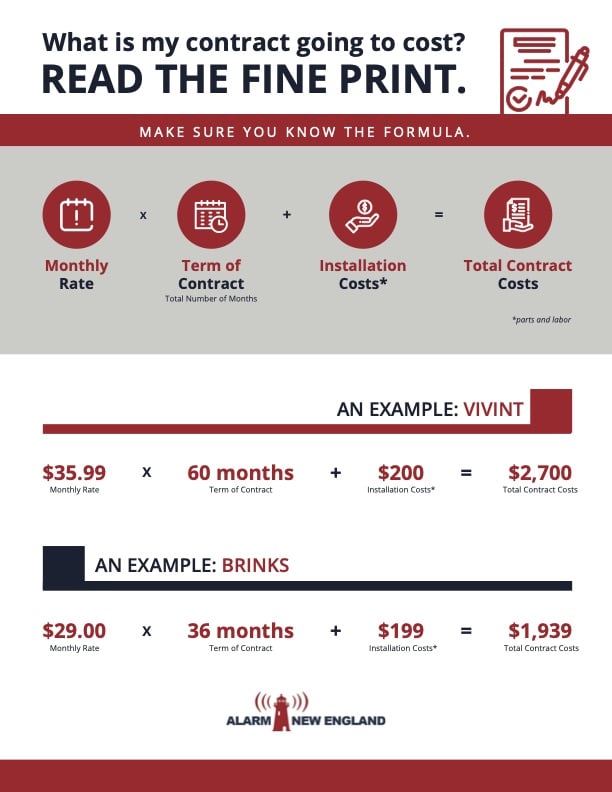
A recommended approach – calculate total contact cost: monthly fee times number of months on the contract plus up front labor and equipment costs and compare companies that way.

An example: Brinks Security 29.00 monthly fee x 36 months of the contract plus the $199 labor and equipment costs equals total contract cost of $1,939.00.

Also, when looking at home alarm system costs, check to make sure the company cannot raise your rates while you are under a contract term. It may seem more affordable up front, but there could be higher monthly fees or long-term contracts.

One thing that’s important to know is that nothing is ever free. Anything that is offered as “free” is really only free when you enter into the correct contract and the fee is covered by that payment.

Each customer is different – some want monthly payments and others want to get it all out of the way, like ripping off a band aid. A few alarm companies will give you the option for paying for everything up front and give you the flexibility of a month to month contract. Most will require a termed contract of 3 years or more but these companies will often help reduce your upfront cost.

A month-to-month option offers flexibility to those who need to cancel and restart their alarm system. Customers pay the full cost of the equipment and installation and then pay for monitoring every month. There’s also the chance that a three-year contract could say the monthly cost starts at one price but then increases. So, we’ll say it again, read the fine print.

Consider Your Budget

If you are like most people, the cost of home security will also be a big consideration. While every company offers different prices, an average alarm system can cost can range anywhere from $300 to $3000. This cost depends on equipment, monitoring fees, and system features.

Alarm New England: Here to Help

For over 47 years we’ve been helping families and businesses feel safe and taken care of here in New England. With our extensive knowledge of security, we’re here to help you find and create the perfect alarm system for your home.

We offer a variety of technologies such as doorbell cameras, security cameras, motion detectors, and smart thermostats. Our dedicated team has experience with all areas of New England and can make the new move an easier process by providing you the tools for building an alarm system that fits your needs.

Dedicated to providing the latest technology in security systems, we can guarantee you’ll love the safe feeling of having our recommended products installed in your home within the budget you want. If you’d like to speak with one of our team members about managing the cost of home security, reach out and call us, so we can create a security package specifically for you—your way, your choice.

Why You Need a Residential Security Assessment in 2026

Every homeowner holds the responsibility of protecting their home. A residential security assessment helps make sure you are taking every precaution to protect your family and belongings. This guide explains why your home needs an assessment and how the process is done.

Why Is A Home Security Assessment Important?

Security assessments analyze the vulnerable points of a home from a security standpoint. A security expert will check doors, windows, and any other entry point, making sure each important area is protected. These will be the locations for sensors, cameras, and any other smart security devices. An assessment creates a detailed and custom safety plan that is particular for your property. Also, insurance companies often lower rates after security upgrades. Plus, the cost of an assessment and security system is small compared to potential theft losses. 

Alarm New England provides a free residential security assessment. No cost and no obligation. Our experts can walk you through the assessment over the phone in just a few minutes. Call (857) 445-4010.

The Process:

Step 1: Identify Entry Points

Doors and windows create weak spots in home defense. Burglars target these areas first. A security assessment checks all entry points for vulnerabilities.

The assessment examines:

Experts identify potentially vulnerable parts of the home like doors and windows. Ground floor windows are the most vulnerable since they are the most easily accessible by a potential intruder. Also, the bigger the home, the more entry points it has. Based on these factors, a security expert will recommend certain equipment. This includes motion sensors and cameras for any areas that need added protection.

Once intrusion detection is covered, the security expert will then suggest any additional protection, like smoke detectors, carbon monoxide detectors, flood sensors, or phone app integration.

Step 2: Review Existing Equipment

Do you have existing security equipment in the home that isn’t currently working? During a residential security assessment, a security expert can assess any existing security equipment to see if it is usable. Activating existing equipment can help save you money and maximize your initial investment.

Alarm New England experts can take a look at your home’s existing equipment and determine if you can use that or require an upgrade. Call for a free assessment – (857) 445-4010.

using total connect app

Step 3: Set Up Monitoring and Emergency Response

Quick emergency response saves lives and property. The next step of a security assessment is setting up monitoring to ensure fast emergency response.

This includes:

  • Connecting the alarm system to the central station
  • Setting up emergency contacts for the monitoring center to notify about any signals

A security expert will check your alarm system’s connection to the central station. The connection is important because any signal from your system will notify the central station, who will then notify any designated contacts to confirm if there has been an emergency, if there is an emergency or if there is no response, authorities will be notified. This quick response can make all the difference in an emergency situation.

Take Action Today

Book a security assessment to protect your home. Experts can find risks you might miss if you take on the task yourself. Getting a free security assessment might .

Regular assessments keep security current. Crime methods change fast. Updates protect against new threats. Your family deserves this protection.

Contact the security professionals at Alarm New England today. Ask about our packages, and start improving your home security today.

looking for home security

3 Best Local Security Companies in Rhode Island | RI Security Guide 2026

When it comes to protecting your home and family, it’s important to choose the right security company.

In Rhode Island, there are several great local options to consider. Here, we’ll take a closer look at the three best local security companies in the state for 2026.

We’ve done the research so you, as a RI resident, can feel confident about the home security provider you choose.

Here are the top 3 local alarm companies in Rhode Island we recommend.

Alarm New England

Alarm New England is a local, family-owned business with an impressive 50+ years of service under its belt. This longevity speaks to our commitment to quality and customer satisfaction.

Alarm New England is an Alarm.com partner, meaning the technology we use is always cutting-edge.

looking for home security

Home Security Systems RI Price

Alarm New England offers flexible plans and pricing, with the basic option starting at $31.99 per month.

There are both monthly options and you can save money by signing up for the industry standard three year term.

Features and Equipment

Alarm New England is consistently testing and implementing the latest in residential and commercial security products. Our company is committed to providing customers with modern security systems that are effective and easy to use.

Alarm systems are monitored 24/7 at a UL-listed monitoring facility. This means any emergency signals that come from a customer’s system are fielded in real-time by a trained professional. This ensures a fast response in the case of an emergency.

Alarm New England provides professional installation, so all alarm system installations go on without a hitch. Generally, we recommend that our customers install an alarm keypad, which acts as the main brain of the system. We use Qolsys hardware, including the Qolsys IQ Panel 4.

The IQ features a great-looking 7″ HD touchscreen keypad which acts as a superb way to control any residential or commercial security system. From this single device, you can control your alarm system, smart locks, thermostats, and much more.

Alarm New England also offers cutting-edge home video monitoring and fire/environmental protection services. Whether you are looking for indoor and outdoor cameras, or smoke and carbon monoxide detectors, our professionals can help you install and maintain a fully integrated security system.

Customer Service

Since Alarm New England is a locally-based company with offices in Rhode Island, the customer service is second to none. You can find our Providence office at 26 Hemingway Dr Ste A in Riverside, RI. Our office is fully-staffed with trained technicians who are actual employees of our company. Not contractors like many competing security companies.

Pros

Alarm New England Pros:

  • 50+ years of service in the New England region
  • Competitive, flexible pricing– starting at $31.99
  • Top of the line Qolsys and Alarm.com equipment for home or business
  • Locally-based customer service from a Providence, RI location.

Ocean State Alarms

Ocean State Alarms is a family-owned company that provides security systems in Rhode Island. Since 1974 it has been protecting homes in the state of RI. The office is located in Warwick.

The company specializes in home security systems with intrusion detection, fire protection and more.

Price

Ocean State Alarms offers competitive pricing for its locally-based customers. RI residents can take advantage of a free security consultation and online payment options on Ocean State Alarm’s website.

Features and Equipment

Ocean State Alarms is a multifaceted alarm company offering a wide variety of services including intrusion, fire detection, access control, door locks, wireless systems, and video surveillance cameras.

As a licensed distributor of NAPCO Security Technologies products, they offer advanced security systems designed for comprehensive coverage.

The company offers 24/7 monitoring services from a UL-listed station, so you can rest assured your signals are being monitored by a qualified operator.

Customer Service

As a local, Rhode Island-based company, customer service will be more hands on with Ocean State Alarms than it would be with a larger national brand.

There are not very many reviews published online for Ocean State Alarms, but many of the reviews we did find are positive. The company is rated 4.5 on Angi, but with only a few positive reviews.

Pros

Ocean State Alarms Pros:

  • Local customer service
  • Highly experienced, 45 years in Rhode Island
  • Free quote and competitive pricing

Cons

Ocean State Alarms Cons:

  • Not many online reviews available
  • NAPCO equipment can sometimes be hard to service

Rhode Island Home Security

Price

Rhode Island Home Security is known for competitive pricing. The company offers a home security bundle including a a touchscreen keypad, 3 window/door sensors, and one motion detector for just over $1000 (24/7 monitoring not included).

Features and Equipment

A comprehensive home security system is the main goal of Rhode Island Home Security. Their systems are often integrated with multiple connected parts, like alarm systems, environmental sensors, smart locks, temperature control, indoor/outdoor home video camera systems and more.

Customer Service

Due to the presence of strong reviews, it’s clear that RI Home Security takes customer service seriously. The company prides itself in giving customers a 5-star experience.

Pros

RI Home Security Pros:

  • Smart home technology
  • Strong reviews online
  • Rhode Island-based customer service

Cons

RI Home Security Cons:

  • Not as long running, 15 years experience

Our 3 Top Picks For Local Home Security Systems RI

The three options in this list round out our picks for local home security companies in RI for 2025! For more information, get in touch with the knowledgeable staff at Alarm New England today.

Security related questions? Give our Providence office a call at any time (401) 366-2600 or reach out to our team at sales@alarmnewengland.com.

Alarm New England’s Rhode Island office is located at 26 Hemingway Dr Ste A in Riverside, RI 02915. You can see exactly where our Rhode Island location is on the map below. We hope to see you in 2026!

The 6 Best Personal Alarms for Self Defense in 2026

What do you do when you’re in danger while walking on the street or using public transit and find yourself are alone? Depending on the situation, it may not be easy to defend yourself physically or call for help.

That’s why a number of personal protection devices have been developed to keep people safer in situations where it’s hard to call for help or fight back. These devices, such as pepper spray, tasers, and expandable batons, are innovative and easy to use, making it easier for people to feel safe no matter where they are.

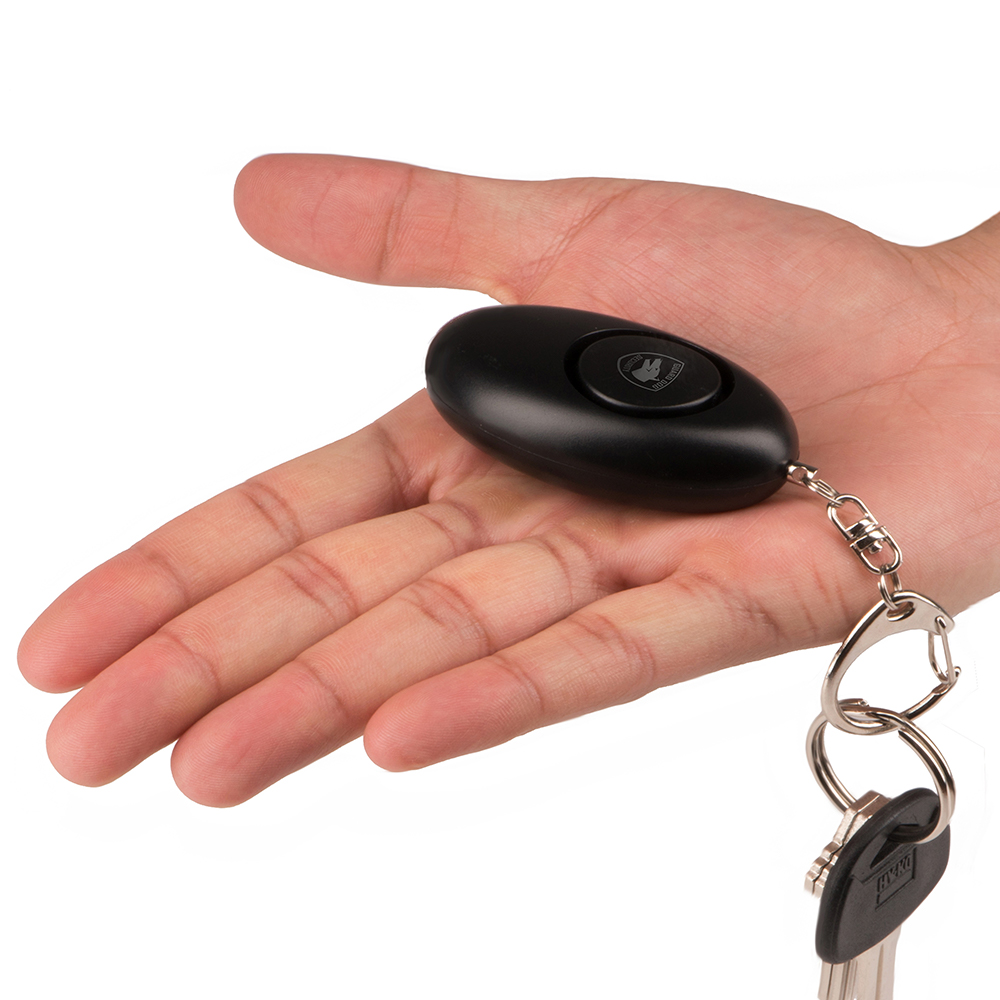
A personal alarm is a newer solution to personal safety. Once you press the button on the keychain-sized device, the piercing alarm sounds hundreds of feet away. Not only are personal alarms varied in features and functionality, but they’re also legal in every state, unlike other personal defense items.

Personal alarms can be used to alert the people around you that you’re in danger. And most are loud enough to disorient attackers, allowing you to get away safely.

Here are our top five personal alarms for different people and situations.

Best App-Based Personal Alarm: Alarm.com Personal Safety Button

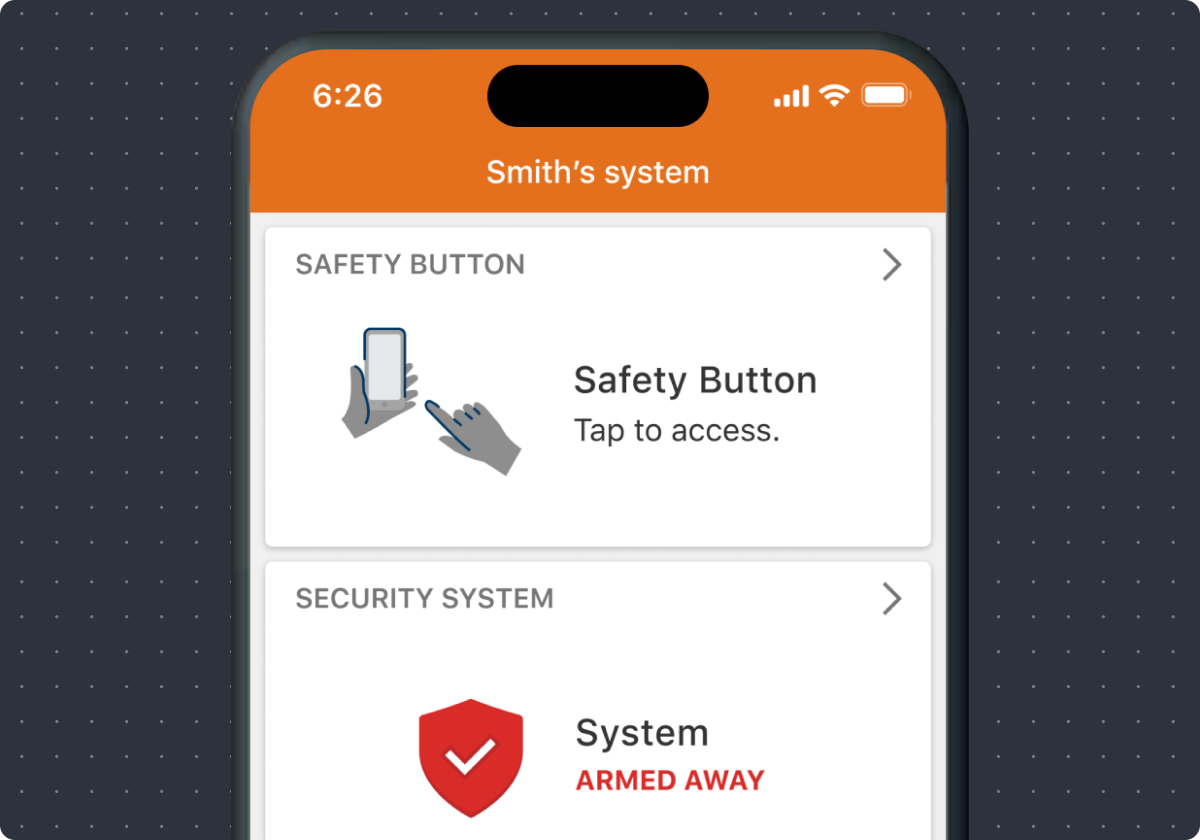
Alarm.com’s Personal Safety Button is a revolution in professionally monitored personal safety. In today’s day and age when smartphones are on our person at nearly all times, an app-based digital panic button is the ideal solution for many individuals. The easy-to-use app includes widget capabilities, so the panic button can be placed directly on your phone’s home screen – no need to even open the app. The speed and easy use of Personal Safety Button makes it effective in potential emergency situations when time is of the essence. It’s also discrete and uses your phone’s GPS location to let operators know where you are located without drawing any unwanted attention.

Learn more about Alarm.com Mobile Safety Button here.

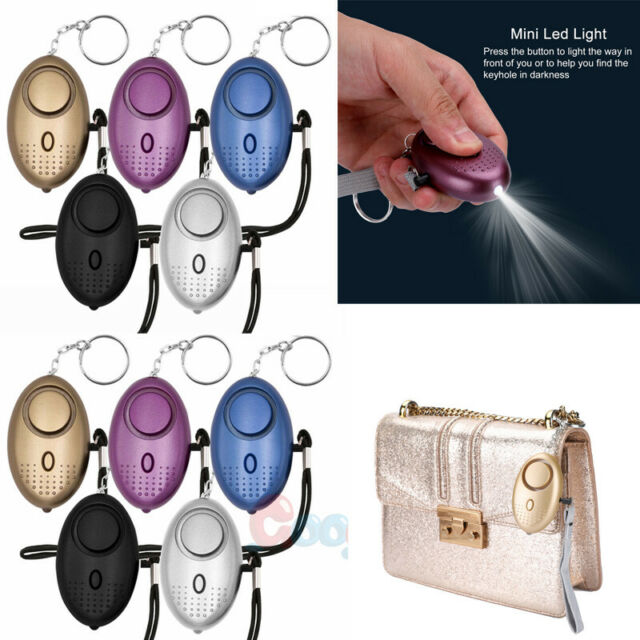
Best Personal Alarm for Elderly: KOSIN Safe Sound Personal Alarm 140dB

The KOSIN Safe Sound Personal Alarm keychain is perfectly designed to clip onto a variety of places, whether on your belt, backpack straps, and any other place you can think of.

safe sound personal alarm keychain emergency siren

This alarm comes in a pack of six, so you can share with friends and family or use them for different outfits and bags. Activating this 140-decibel alarm will have any attacker clutching their ears in hopes of keeping out the screeching sound. This gives you enough time to run to safety or defend yourself.

This alarm is powered by three AG13/LR44 batteries. The batteries can power the alarm for 50 minutes, more than enough time to call for help from several miles away. When the alarm is not in use, these batteries give the alarm a battery life of over one year. You will only need to change the batteries once a year.

The device is encased in ABS plastic to prevent people from breaking the alarm. This protects the alarm against falls, getting crushed, or even exposure to high temperatures.

What we like:

  • The KOSIN alarm comes in a six pack with different colors so you can coordinate with your outfits and accessories.
  • It comes with both a keychain and a wrist lanyard, giving you plenty of options for easy, fast access to the alarm.
  • The pin-activated alarm is simple to use: Simply pull out the cord, and the alarm will sound.

What we don’t like:

  • Accessing the batteries requires a screwdriver to remove the back cover.

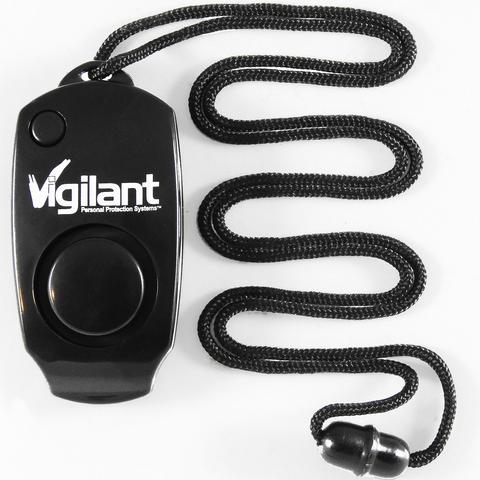
Best Personal Alarm for Runners: Vigilant 130 dB Wearable Personal Protection Alarm with Backup Whistle and Neck Lanyard

This Vigilant wearable alarm looks like something from a Sherlock Holmes movie set in early 20th-century London, but the loudness of this alarm jolts you firmly back into the 21st century. This personal alarm is versatile and wearable—you can wear it around your neck as a lanyard.

vigilant electronic attack personal alarm

To alert people that you’re in danger, you have two options. First, this personal protector has a built-in whistle for threats that are easily driven off at the thought of people nearby intervening.

If bystanders are farther away or you need to physically drive away an attacker, you can choose to activate the extremely loud alarm. The 130-decibel alarm is way beyond what the human ear can take: People can only tolerate 100 decibels for 15 minutes.

What we like:

  • The dual feature makes it versatile; in case the alarm batteries die, you can fall back on the whistle.
  • The weight on this thing makes it absolutely unnoticeable to the wearer. At 1.5 ounces, the alarm will feel like an accessory rather than a safety tool.
  • The device is built to survive the harshest conditions you’ll encounter and can survive various shocks, such as falls or smashing attempts.

What we don’t like:

  • The device only comes with two replaceable LR44 batteries. This means you need to check often whether the batteries are still working.
  • This alarm is not the best for people who want to hang their protectors off their belts or keychains.

Best Personal Alarm for Women: Vigilant 130 dB Personal Alarm PPS8

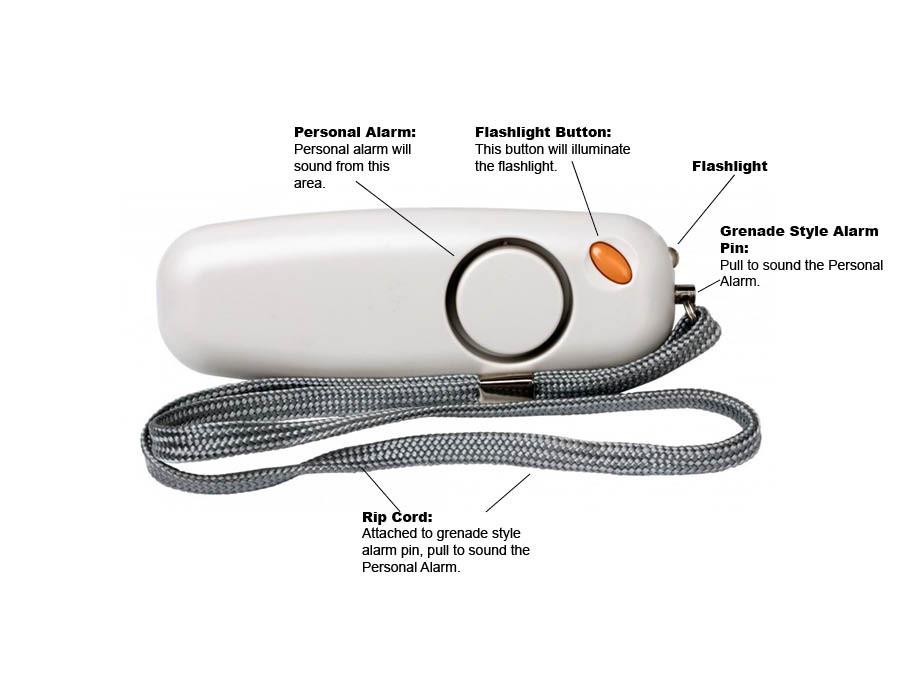
Vigilant’s Personal Alarm PPS8 is our pick for the best personal alarm for women. Unlike other ominous-looking personal alarms, this device does a wonderful job of being subtle as it is easily confused for a tiny power bank or a bluetooth device.

vigilant personal alarm wristlet

With a built-in LED light, this alarm is truly a multifunctional tool. If you have to take that shortcut home but the alleyway is dark, whip out this personal protector and illuminate your way home.

This device is very convenient to use in stressful situations. Most other alarms require you to reach for them, whether in your purse or on your belt, and then fumble to press a button while the attacker is bearing down on you.

With this device, the lanyard also acts as the activation device. Simply pull out the lanyard, and a pin will be removed, setting off the alarm. So whether it is hanging off your neck or it is nestled in your pocket, it’s just a matter of reaching out and with one move, scaring the attacker away.

What we like:

  • It comes with two replaceable AAA batteries, which are easily replaceable.
  • The easy-to-use alarm gives the carrier an element of surprise and an opportunity to reclaim power over the situation.
  • The 130-decibel alarm will disorient any attacker (and draw attention to them).
  • This personal alarm weighs a mere 0.64 ounces, making it one of the lightest personal protectors on the market.

What we don’t like:

  • The device doesn’t look like a personal alarm, but its appearance is a bit bland for style-conscious people.
  • The pin activation method, though easy to use, makes it more likely that you accidentally set off this alarm.

Best Personal Alarm for College Students: BASU eAlarm Plus

The BASU eAlarm Plus is one of the smallest personal protectors on the market. In fact, BASU claims that if you find anything smaller, they will give you this model for free.

baso ealarm

Not only is the device small, but its design looks similar to a USB drive and comes in a variety of bright, popping colors.

Don’t let the bright colors fool you, though. The device is powered by two CR1632 batteries and is capable of pushing out 130 decibels of repellant alarm. Any attacker approaching you will be instantly repelled by the noise.

What we like:

  • The alarm is easy to operate: Simply pull out the pin, and the alarm goes off. Put it back in, and the alarm stops.
  • The device’s hoop means you can set up this alarm as a tripwire for an early warning system.
  • The protector is built into a rubberized casing that makes it capable of withstanding great shocks.

What we don’t like:

  • Aside from the alarm, there are no other features on this device.
  • In case you’re stuck waiting for rescuers, the alarm will only provide 30 minutes of sound before the batteries die out.

Best Personal Alarm with GPS: Katana Safety Arc

The features on personal alarm devices vary from simplistic loud alarms to more sophisticated devices that go further in protecting you and sending help when you’re in distress. The Katana Safety Arc is one of the more sophisticated (and expensive) devices on the market and combines innovative features with ease of use.

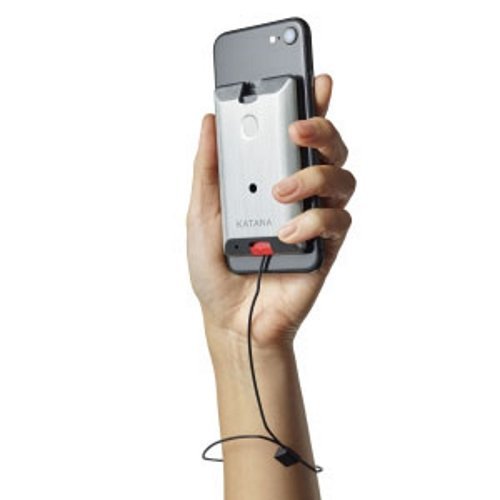
katana safety arc personal alarm system

The Katana Safety Arc is a smart personal alarm that is mounted to your smartphone. It comes with a GPS locator so you can be located when you set off the alarm.

The device comes with a smartphone app. When the alarm is triggered, the app bypasses your lock screen and sends your location to the Katana Safety team, who will then call law enforcement and tell them where you are. You can also choose to send your location to up to seven friends.

There are three ways to operate this device. The first is by pulling a red tab on the bottom of the device, which will let out an alarm to scare away any would-be attackers. The second is by using a lanyard on your wrist. In case of trouble, simply drop the phone and the tab will be pulled.The third is more subtle.

There is a button on the back of the device that sends a silent alarm when pushed. This is for situations where sudden, loud sounds could put you in even more danger.

What we like:

  • The alarm is slim enough that you’d never feel like you’ve attached an extra battery to your phone.
  • Despite all its innovative features, this device will only add 1.44 ounces to your phone.
  • The smartphone app and GPS location tracking adds peace of mind so you know law enforcement is on the way when you trigger the alarm.

What we don’t like:

  • The device is more expensive than other personal alarms on the market, starting at $100.
  • The Katana Safety team option is only for paid subscribers. Those who opt out of the subscription won’t get a direct line to a police dispatcher.

What Features Should the Best Personal Alarm Have?

Personal alarms on the market have a variety of features and functions. Before you choose one, consider the following features and determine which ones are a priority for you.

1. Purpose

Different personal alarms have different functions. A personal alarm device has two main uses. The first and most obvious use is to ward off attackers. Secondly, they are also used as monitoring devices for vulnerable people, such as the elderly or people who are sick, so that caregivers are alerted if the person is in harm.

2. Type

Figure out what type of alarm works best for you based on the situations when you’ll need the alarm handy. Personal alarm devices come in three main varieties:

  • A keychain device, which can be included with your keys
  • A device with a lanyard that can be worn around the neck like a pendant or hang from the wrist
  • A smartwatch worn around the wrist. Some of these alarms can be synced up with your smartphone, and many have advanced features.

3. Simplicity

As much as it may look cool to have a device that looks like futuristic alien technology, your personal alarm needs to be easy to use when you need it.

This is why many personal protective devices come with a big button right on the face. These big buttons allow people to easily and quickly trigger the alarm.

Other alarms are triggered by pulling out a pin. One flick of the wrist, and the attacker is suddenly more likely to be caught—and likely to get their ears damaged from the piercing alarm if they don’t flee.

4. Battery life

An emergency can happen at any time. And when it happens, you don’t want to reach for your personal alarm only to find a dead battery.

Personal alarms use a variety of batteries, including button cells and lithium metal batteries. These batteries’ lives vary greatly depending on the device’s functionalities. Devices with more features will use up more battery power.

That means that if you get a more sophisticated device, you need to be vigilant about checking and replacing batteries more frequently than with more simplistic personal alarms.

5. Additional features

Some people want their personal alarm to have more features so they can use it in different situations.

These additional features can include LED lights for illumination, or maybe smart features such as a GPS locator. However, the more features the personal alarm has, the higher the price tag will be.

Frequently Asked Questions About Personal Alarms

1. What is a safe personal alarm?

A safe personal alarm is a device you can carry with you on your neck, wrist, pocket, bag, belt, or other place. The device emits a loud sound when you trigger it that can ward off attackers, whether people or misbehaving animals. This loud racket is also a call for help to people in the vicinity.

2. What is the best personal safety or attack alarm?

There’s no definitive answer on the best alarm as every person has their own needs. Some will want a simple alarm with basic functionality, while others will want something that has the capability to alert law enforcement of their current location.

3. How loud is 140 decibels?

Measuring sound is completely different than measuring distance. On a ruler, the distance between inches increases by the same amount, but in sound, that is not the case.

Sound goes up by the power of 10 with each 10-decibel increase. So a 20-decibel sound is 10 times more intense than a 10-decibel sound. If it goes up to 30 decibels, the sound is 100 times more intense than sounds at 10 decibels.

When scaling up to 100 decibels, the sound becomes 1 million times more intense than at 10 decibels. Sounds upward of 85 decibels are considered damaging, and it is recommended to get away from them as soon as possible. Sounds at 140 decibels will cause damage to someone’s ears after 15 minutes.

4. Are personal alarms effective?

Personal alarms are most definitely effective. Just the sound of the alarm itself, around 140 decibels, is much louder compared to other sounds. A full-blown concert at the loudest will be around 80 decibels, and those can be heard from quite a distance.

An alarm emitting 140 decibels of noise can significantly disorient anyone around it, especially when people are not expecting it. Disorienting an attacker with a personal alarm will make them stop and brace themselves from the noise, giving you an opportunity to escape. The noise will also alert other people of your location so you can get help.

5. How much does a personal safety alarm cost?

Cost varies depending on what type of personal alarm you want. The simplest devices start from $10, while devices with more features and higher-quality materials will be more expensive. You can easily find a personal alarm in your price range.

X

GET FREE QUOTE

What are you protecting?*

Step 1 of 4

Is your property currently monitored?*

Step 2 of 4

What size is your property?

Step 3 of 4

Who is this personalized quote for?*

By clicking this button, you consent for Alarm New England to use automated technology to contact you at the number provided. This consent is not required to make a purchase from us.

Step 4 of 4